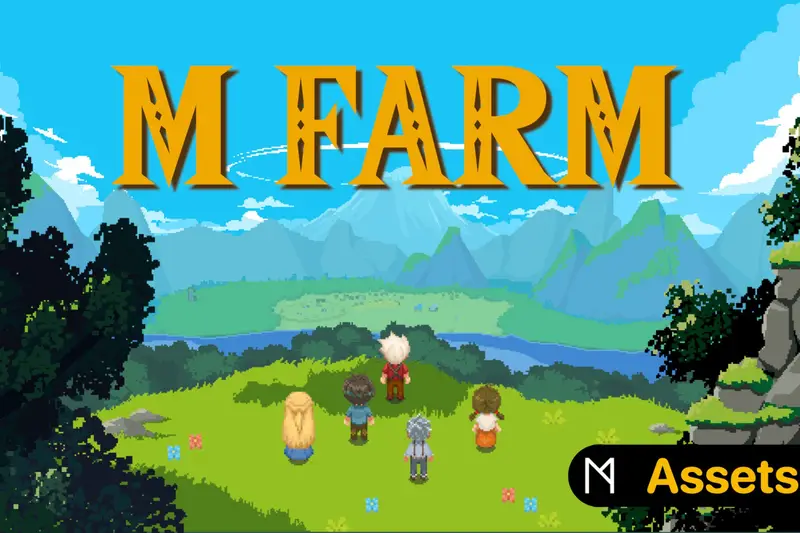
2D TopDown Tilesets Fantasy Dreamland
About 2D TopDown Tilesets Fantasy Dreamland – Unity 2D & UI Pack
2D TopDown Tilesets Fantasy Dreamland Unity Asset Overview
Building a top-down 2D world in Unity often breaks down at the art consistency stage. As someone who has spent over eight years architecting 2D tile-based engines and character controllers, I can tell you that finding a cohesive, comprehensive asset kit is half the battle. 2D TopDown Tilesets Fantasy Dreamland addresses this exact pain point by offering a unified, pixel-art environment system tailored specifically for top-down perspectives.
From an architectural standpoint, the asset is structured around grid-based modularity. Sprites are aligned tightly to standard pixel grids (typically 16x16 pixels per unit base metrics), allowing developers to directly construct levels using Unity's native Tilemap component without worrying about visual seams or misaligned colliders. Beyond raw terrain graphics, the package supplies character animations, basic UI components, and atmospheric templates to streamline early visual prototyping and production-grade level design.
Core Technical Features & Highlights
In my experience, pixel art packages often look great in promotional screenshots but fall apart when you import them into a clean Universal Render Pipeline (URP) project. Fantasy Dreamland handles this transition gracefully because of its clean texture structure and crisp packing.
Key Technical Specs
- Standardized Grid Alignment: Art assets are authored with exact pixel-density metrics, eliminating sub-pixel rendering artifacts and texture bleeding when properly configured.
- Rule Tile Compatibility: Tile atlases translate smoothly into Unity's 2D Tilemap Extras, allowing auto-tiling for paths, cliffs, water bodies, and wall corners.
- URP 2D Light Ready: Sprites interact cleanly with Sprite-Custom shaders and Unity's Light 2D components (Point, Spot, and Global 2D lights).
- Layer Depth Management: Clean segregation across visual layers makes establishing sorting structures—such as Ground, Decoration, AbovePlayer, and Colliders—straightforward.
Here is a practical C# example demonstrating how to dynamically sample terrain types from a Unity Tilemap constructed with Fantasy Dreamland tiles. This script checks the tile under a player character to dynamically adjust move speed (e.g., slowing down when wading through water or swamp tiles):
using UnityEngine;
using UnityEngine.Tilemaps;

public class TerrainSpeedModifier : MonoBehaviour
{
    [SerializeField] private Tilemap groundTilemap;
    [SerializeField] private float baseMoveSpeed = 5.0f;
    [SerializeField] private float slowTileMultiplier = 0.5f;

    public float GetCalculatedSpeed(Vector3 playerWorldPosition)
    {
        if (groundTilemap == null) return baseMoveSpeed;

        // Convert player position to Grid Cell coordinates
        Vector3Int cellPosition = groundTilemap.WorldToCell(playerWorldPosition);
        TileBase currentTile = groundTilemap.GetTile(cellPosition);

        if (currentTile != null)
        {
            // Simple identification based on tile naming conventions
            if (currentTile.name.ToLower().Contains("water") || currentTile.name.ToLower().Contains("swamp"))
            {
                return baseMoveSpeed * slowTileMultiplier;
            }
        }

        return baseMoveSpeed;
    }
}
Ideal Use Cases & Game Genres
This environment suite fits remarkably well into traditional 2D archetypes. Here is where the art style and layout shine brightest:
- Classic Top-Down Action RPGs: Excellent for retro adventure titles reminiscent of 16-bit classics, requiring clear visual communication between walkable ground and impassable obstacles.
- Turn-Based Tactical Games: The strict grid layout makes calculating movement tiles, cover zones, and line-of-sight boundaries simple.
- 2D Farming & Survival Simulators: Includes environmental assets (crops, trees, clutter, structures) suitable for building interactive farming loops or resource gathering nodes.
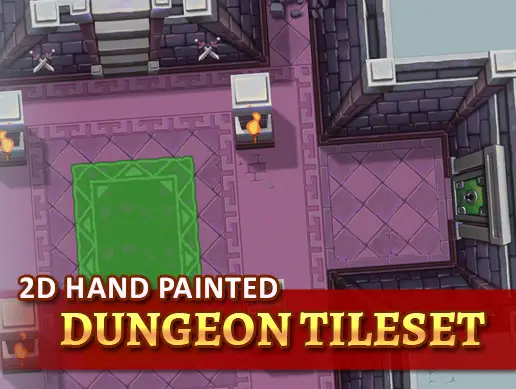
- Roguelite Dungeon Crawlers: The modular wall and floor tiles combine smoothly with procedural generation algorithms using matrix-based tile placement.
Quick-Start Unity Setup & Integration Guide
Here is the exact step-by-step pipeline I recommend when bringing Fantasy Dreamland into a fresh Unity installation:
Step 1: Import Settings & Texture Optimization
Select all incoming sprite sheet textures in the Project window and apply the following settings in the Inspector:
- Texture Type: Set to
Sprite (2D and UI). - Sprite Mode: Set to
Multiple(use the Sprite Editor to slice by cell size, usually 16x16). - Pixels Per Unit (PPU): Set precisely to match your art base (typically
16). - Filter Mode: Set strictly to
Point (no filter). This avoids blurry pixel art. - Compression: Set to
Noneor high-quality uncompressed format to avoid color distortion on fine pixel details.
Step 2: Configuring the Grid and Sorting Layers
Create a 2D Grid in your Scene hierarchy by selecting GameObject > 2D Object > Tilemap > Rectangular. Configure your project's Sorting Layers to ensure proper visual rendering order:
// Recommended Order in Layer Stack:
// 1. Background
// 2. Ground
// 3. GroundDecoration
// 4. Player / Entities
// 5. AbovePlayer (Tree Tops, Roof Ceilings)
// 6. UI
Ensure your main camera uses a Pixel Perfect Camera component if you want to eliminate visual jitter during camera movement.
Pros & Cons Assessment
Pros
- Cohesive Art Style: Palette choices across environments, props, and UI feel unified out of the box.
- Versatile Asset Selection: Combines ground terrain, interiors, dungeon elements, characters, and basic UI into one suite.
- Performance Friendly: Low memory footprint and optimized sprite sheets allow easy batching via Unity's Sprite Atlas system.
- Ease of Prototyping: Ideal for setting up playable greybox-replacement levels within hours.
Cons
- Manual Rule Tile Setup Required: Depending on the package package version, you may need to build custom Rule Tiles by hand using Unity's 2D Tilemap Extras.
- Fixed Pixel Scale: Blending these assets with non-pixel art components or different native resolutions requires careful rendering camera adjustments.
Asset Details & Specifications
| Category | 2D / Environments |
|---|---|
| Latest Version | v5.16.0 (2 tracked releases) |
| File Size | 14.32 MB |
| Added to Platform | February 9, 2026 |
| Views | 8 views |
| Downloads | 2 downloads |
| Favourites | 0 favourites |
| Issue with Package? | Report Broken Link → |
![[Fire] Fantasy 2D Background : Village](https://ultimategameassets.com/api/images/optimize?url=%2Fuploads%2Fscraped%2F53f06bb452500f805276ae386e088647.jpg&width=800)