Dark Creatures Pack
About Dark Creatures Pack – Unity 3D Character Model
Dark Creatures Pack Unity Asset Overview
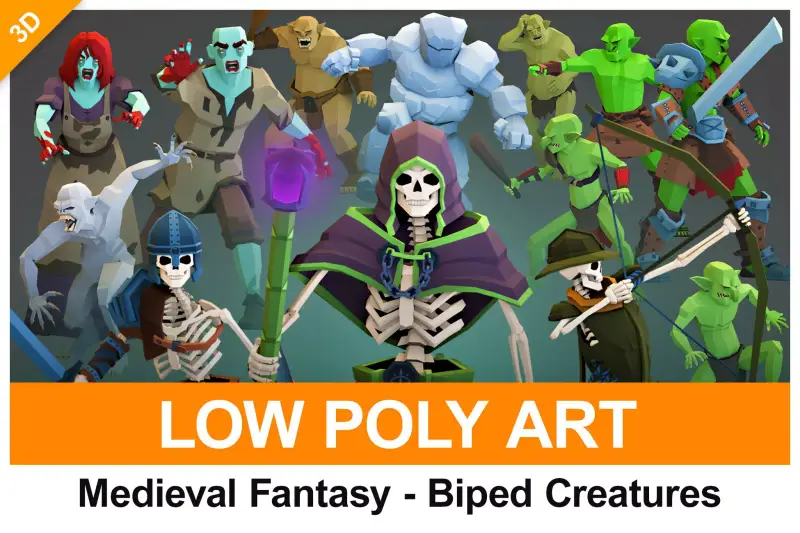
Honestly, character pipelines are one of the biggest time sinks in game development. When building dark fantasy or survival horror titles, getting high-quality monster meshes, rigging them cleanly, authoring matching VFX, and tuning animation state machines can easily take weeks per character. The Dark Creatures Pack addresses this bottleneck head-on by providing a production-ready collection of monstrous entities, companion environmental props, atmospheric VFX, and combat-ready animation sets right out of the box.
From an architecture standpoint, this package isn't just a random art drop. The meshes utilize standardized skeleton structures—mostly mapped to Unity's Humanoid Rig architecture with custom bone extensions for tails, jaws, and wings. The material pipelines rely on modern PBR (Physically Based Rendering) texture maps that integrate cleanly across standard Built-in, Universal Render Pipeline (URP), and High Definition Render Pipeline (HDRP). Here is the key takeaway: having matching environment scatter models and particle assets included alongside the creature rigs lets you build a cohesive visual scene without needing to mix and match disparate asset packs.
Core Technical Features & Highlights
In my experience, the difference between an asset pack that looks good in screenshots and one that actually runs smoothly in a shipping game comes down to optimization and technical rigor. This pack holds up well under technical scrutiny.
Key Technical Specifications
- Polycount Efficiency: Base character meshes range between 12,000 to 22,000 triangles, accompanied by pre-configured LOD (Level of Detail) groups (LOD0, LOD1, LOD2) dropping down to ~2,000 triangles for background or swarm rendering.
- Texture Maps: High-resolution 4K and 2K textures including Albedo/BaseColor, Normal Map, Metallic/Smoothness (Packed), Ambient Occlusion, and Emission Maps for glowing eyes and arcane runes.
- Rigging & Kinematics: Configured for Unity's Mecanim system. Primary humanoids support standard retargeting, while specialized quadrupeds use custom Generic Rigs with pre-baked animation clips.
- VFX Integration: Native Unity Particle System (Shuriken) prefabs for dark aura emission, blood splatters, shadow footsteps, and spatial spawn effects.
- Performance Optimization: Materials utilize texture packing (Metallic in RGB, Smoothness in Alpha channel) to minimize sampler counts in custom shaders and lower draw calls.
Ideal Use Cases & Game Genres
While designed around dark aesthetics, the technical setup makes these assets flexible across several core game archetypes:
- Soulslike & Action RPGs: Excellent fit for mid-tier boss encounters, elite mob variants, and ambient dungeon dwellers requiring detailed close-up meshes and distinct attack animations.
- First-Person Survival Horror: High-detail 4K textures hold up extremely well under direct flashlight beam lighting and close proximity encounters in narrow corridors.
- Isometric Action Roguelikes: Thanks to the lower LOD variants and clear silhouette design, these creatures remain easily readable from high top-down camera angles.
- VR Horror Experiences: Optimized geometry combined with pre-calculated normal maps provides solid spatial depth without overwhelming mobile VR hardware like the Meta Quest series.
Quick-Start Unity Setup & Integration Guide
Setting up an enemy prefab from this pack in a project takes only a few minutes if you structure your scripts properly. Below is a practical step-by-step workflow and component setup.
Step 1: Pipeline Conversion
If you are working in URP or HDRP, import the asset into your project, open Window > Rendering > Render Pipeline Converter, select Built-in to URP/HDRP, check Material Upgrade, and click Convert Assets. This ensures all emissive and normal maps translate properly without purple missing shader errors.
Step 2: Implementing the Creature AI Script
Attach a NavMeshAgent component, a CapsuleCollider, an AudioSource, and your customized Animator Controller to the creature prefab. Then, attach the following C# script to handle basic movement state parameters, pathfinding target chasing, and attack triggers:
using UnityEngine;
using UnityEngine.AI;

[RequireComponent(typeof(Animator))]
[RequireComponent(typeof(NavMeshAgent))]
public class DarkCreatureAI : MonoBehaviour
{
    [Header("Detection Settings")]
    [SerializeField] private Transform targetPlayer;
    [SerializeField] private float attackRange = 2.2f;
    [SerializeField] private float chaseSpeed = 3.5f;

    [Header("Effects")]
    [SerializeField] private ParticleSystem auraVFX;

    private Animator animator;
    private NavMeshAgent navAgent;

    // Cached Animator Parameter Hashes for performance
    private static readonly int SpeedHash = Animator.StringToHash("Speed");
    private static readonly int AttackHash = Animator.StringToHash("Attack");

    private void Awake()
    {
        animator = GetComponent<Animator>();
        navAgent = GetComponent<NavMeshAgent>();
        navAgent.speed = chaseSpeed;
    }

    private void Update()
    {
        if (targetPlayer == null) return;

        float distanceToTarget = Vector3.Distance(transform.position, targetPlayer.position);

        if (distanceToTarget > attackRange)
        {
            navAgent.SetDestination(targetPlayer.position);
            navAgent.isStopped = false;

            // Pass normalized speed to Mecanim blend tree
            animator.SetFloat(SpeedHash, navAgent.velocity.magnitude);
        }
        else
        {
            navAgent.isStopped = true;
            animator.SetFloat(SpeedHash, 0f);
            TriggerAttack();
        }
    }

    private void TriggerAttack()
    {
        Vector3 direction = (targetPlayer.position - transform.position).normalized;
        direction.y = 0; // Lock vertical rotation
        if (direction != Vector3.zero)
        {
            transform.rotation = Quaternion.Slerp(transform.rotation, Quaternion.LookRotation(direction), Time.deltaTime * 10f);
        }

        animator.SetTrigger(AttackHash);

        if (auraVFX != null && !auraVFX.isPlaying)
        {
            auraVFX.Play();
        }
    }
}
Pros & Cons Assessment
Pros
- High Visual Fidelity: Sculpt work on skin wrinkles, scales, and skeletal protrusions looks exceptional under dynamic lighting.
- Complete Asset Ecosystem: Including dark environmental props and particle effects alongside character models saves significant world-building time.
- Mecanim Compatibility: Humanoid creatures retarget easily to existing animation sets like standard locomotion or third-party sword combat packs.
- Solid Optimization: Includes properly configured LODs and channel-packed PBR textures ready for performance-sensitive projects.
Cons
- Quadruped Limits: Non-humanoid creatures rely on standard Generic Rigging, meaning you cannot easily re-use human player animations on them.
- URP/HDRP Manual Tweak: Certain complex custom shaders require running the render pipeline material converter upon initial import.
Asset Details & Specifications
| Category | 3D / Characters |
|---|---|
| Latest Version | v1.3 |
| File Size | 256.38 MB |
| Added to Platform | February 9, 2026 |
| Views | 3 views |
| Downloads | 4 downloads |
| Favourites | 2 favourites |
| Issue with Package? | Report Broken Link → |