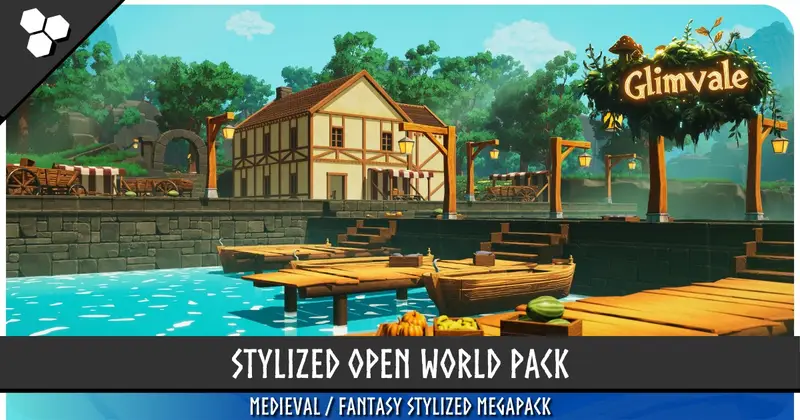
Modular Rural Town / Farm Environment (Medieval,Town,Village)
About Modular Rural Town / Farm Environment (Medieval,Town,Village) – Unity 3D Environment
Modular Rural Town / Farm Environment (Medieval,Town,Village) Unity Asset Overview
In my eight years of developing games in Unity, one of the most persistent bottlenecks I have encountered is the art-to-engine pipeline for large-scale environments. Constructing a believable, performance-friendly medieval or rural village can easily stall production for weeks. The Modular Rural Town / Farm Environment (Medieval,Town,Village) asset addresses this exact pain point by providing a highly organized, grid-aligned modular framework.
Architecturally, this package is designed around standardized pivot points and metric snapping. This means you do not have to waste hours adjusting floating-point offsets to prevent light leaks or visible gaps in your building seams. The modular pieces—ranging from timber frames and stone foundations to thatch roofs and farm fencing—are optimized to work with Unity's native grid system. Whether you are assembling a simple roadside granary or a sprawling medieval town, the asset keeps your scene hierarchy clean and your draw calls highly manageable.
Core Technical Features & Highlights
From a technical standpoint, this asset stands out because it prioritizes runtime efficiency over raw, unoptimized polygon counts. Below are the key technical features of the package:
- Low-Poly Topology with Rich Normal Maps: High visual fidelity is achieved through detailed baked normal maps rather than heavy geometry, keeping the overall vertex count remarkably low.
- Aggressive Material Atlasing: Multiple structural and prop elements share single texture sheets, which significantly reduces the total number of unique materials and draw calls.
- LOD (Level of Detail) Groups: Complex models, such as detailed houses, water wheels, and mature trees, feature pre-configured LODGroup components that transition smoothly to lower-fidelity meshes at distance.
- Shader Graph Compatibility: Shaders included for vegetation feature vertex-color-based wind simulation, giving realistic sway to grass, leaves, and crops without relying on heavy CPU-bound physics simulations.
- Pre-Configured Physics Colliders: Instead of relying on expensive mesh colliders, structural prefabs use a combination of optimized BoxCollider and CapsuleCollider shapes, keeping the physics engine overhead to a minimum.
Dynamic Interaction Scripting
To make the modular town feel lived-in, you will often need to write custom logic for dynamic elements like opening doors, swinging gates, or rotating water wheels. Here is a production-ready C# script that handles trigger-based rotation for modular doors and gates:
using System.Collections;
using UnityEngine;

public class ModularDoorController : MonoBehaviour
{
    [SerializeField] private Transform doorPivot;
    [SerializeField] private float openAngle = 90f;
    [SerializeField] private float transitionSpeed = 3f;

    private bool isOpen = false;
    private Quaternion closedRotation;
    private Quaternion targetRotation;
    private Coroutine movementCoroutine;

    private void Awake()
    {
        if (doorPivot == null)
        {
            doorPivot = this.transform;
        }
        closedRotation = doorPivot.localRotation;
        targetRotation = closedRotation;
    }

    public void ToggleDoor()
    {
        isOpen = !isOpen;
        float angle = isOpen ? openAngle : 0f;
        targetRotation = closedRotation * Quaternion.Euler(0f, angle, 0f);

        if (movementCoroutine != null)
        {
            StopCoroutine(movementCoroutine);
        }
        movementCoroutine = StartCoroutine(SmoothRotate());
    }

    private IEnumerator SmoothRotate()
    {
        while (Quaternion.Angle(doorPivot.localRotation, targetRotation) > 0.05f)
        {
            doorPivot.localRotation = Quaternion.Slerp(
                doorPivot.localRotation,
                targetRotation,
                Time.deltaTime * transitionSpeed
            );
            yield return null;
        }
        doorPivot.localRotation = targetRotation;
    }

    private void OnTriggerEnter(Collider other)
    {
        if (other.CompareTag("Player") && !isOpen)
        {
            ToggleDoor();
        }
    }

    private void OnTriggerExit(Collider other)
    {
        if (other.CompareTag("Player") && isOpen)
        {
            ToggleDoor();
        }
    }
}
Ideal Use Cases & Game Genres
This environment kit is versatile, but its technical composition makes it particularly effective for specific game architectures:
- Indie RPGs & Action-Adventures: The high-quality third-person and first-person camera close-up details make it perfect for crafting quest hubs, trading outposts, and starter villages.
- Medieval Survival & Crafting Games: Because the pieces are modular, you can easily adapt the structural prefabs into buildable tiers (e.g., upgrading a player's house from thatch to stone).
- Top-Down Strategy & RTS: The aggressive LOD setups and clean atlasing allow you to render dozens of these houses simultaneously on-screen without tanking your framerate.
Quick-Start Unity Setup & Integration Guide
Setting up a new environment pack can sometimes throw unexpected errors, especially when dealing with modern Unity render pipelines. Follow this sequence to get the asset running optimally:
Step 1: Project Preparation
Before importing, ensure your project is configured correctly. I highly recommend using the Universal Render Pipeline (URP) for the best balance of performance and visual quality. Go to your Project Settings and ensure your active render pipeline asset is assigned.
Step 2: Package Import & Material Upgrade
Import the package via your package manager. If your project uses URP and the imported models appear bright pink (indicating a material shader mismatch), execute the built-in material upgrader:
- Navigate to Window > Rendering > Render Pipeline Converter.
- Select Built-in to URP from the drop-down menu.
- Check Material Upgrade and click Initialize Converters, then Convert Assets.
Step 3: Establishing the Snapping Grid
To assemble houses without gaps, you must configure Unity's grid snapping settings. Go to Edit > Grid and Snap Settings. Set the increment values to clean integers (such as 1 or 0.5 units). When dragging wall, roof, or floor prefabs into your scene, hold down the Ctrl (or Cmd) key to snap them directly to the grid.
Pros & Cons Assessment
Honestly, no asset is absolutely perfect for every single scenario. Here is my realistic developer assessment of this environment package:
Pros:
- Excellent Modularity: The pieces fit together cleanly. Pivots are placed at the bottom corners or exact centers of structural components, making grid-snapping a joy.
- Great Performance Optimization: The heavy use of texture atlasing keeps draw calls remarkably low, which is a massive win for mobile and mid-range target platforms.
- Beautiful Lighting Setup: The included demo scenes feature pre-baked lightmaps that demonstrate how to achieve fantastic depth using simple directional and point light setups.
Cons:
- Stylistic Consistency: The textures have a specific rustic, slightly stylized realism. If your project aims for high-fidelity photorealism, you will need to swap out the base materials.
- Interior Setup: While the exterior modularity is stellar, setting up complex multi-room interiors requires extra patience and some custom collider adjustments to prevent player cameras from clipping through thin timber walls.
Asset Details & Specifications
| Category | 3D / Environments |
|---|---|
| Latest Version | v1.0 |
| File Size | 3.39 GB |
| Added to Platform | June 8, 2026 |
| Views | 3 views |
| Downloads | 3 downloads |
| Favourites | 1 favourites |
| Official Store | Buy Original License on Unity Asset Store → |
| Issue with Package? | Report Broken Link → |