Synty ANIMATION - Emotes and Taunts
About Synty ANIMATION - Emotes and Taunts – Unity 3D Asset
Synty ANIMATION - Emotes and Taunts Unity Asset Overview
In my 8+ years working with Unity across indie setups and mid-sized studios, character expression has always been one of those details that elevated a title from feeling rigid to feeling alive. Synty Studios built a massive reputation on clean, iconic low-poly art assets, but static models only take a project so far. The Synty ANIMATION - Emotes and Taunts pack addresses the constant demand for expressive, modular, and performant character animations tailored specifically for low-poly and stylized environments.
Architecturally, this asset functions as an extensive library of Mecanim Humanoid-compatible animation clips. Rather than locking developers into proprietary scripts or rigid state machines, Synty structured these clips to bind cleanly onto Unity’s standard Avatar system. Whether you are running Synty's own POLYGON character series or a custom rig created in Blender, the bone mapping maps straightforwardly provided your character matches standard Humanoid Rig definitions.
Core Technical Features & Rigging Highlights
From an engine perspective, animation assets need to satisfy three core criteria: clean keyframing, efficient memory footprint, and hassle-free retargeting. Honestly, Synty nailed the mechanical execution here. The keyframes are tight, stylized with intentional exaggerated timing, and clean of unnecessary transform noise.
Key Technical Specifications
- Rig Format: Standard Unity Humanoid, enabling universal retargeting across custom models, Mixamo rigs, and Synty mesh collections.
- Clip Variants: Provides both root-motion and in-place animation variants for flexible movement implementation.
- Animation Curves: Smooth interpolation curves configured directly out of the box, preventing rigid linear transitions during state blend trees.
- Pipeline Agnostic: Because these are pure animation clips and mesh-agnostic rigs, they are 100% compatible with Built-in Render Pipeline, URP, and HDRP.
- Performance Footprint: Minimal memory overhead; keyframe reduction has been applied without sacrificing the snappy, expressive readability of the poses.
Root Motion vs. In-Place Execution
One detail I really appreciate during implementation is how Synty managed displacement. Animations like dances or aggressive taunts often suffer from foot sliding if forced into an in-place configuration. Synty supplies properly baked root motion options alongside locked in-place clips, allowing you to drive character displacement via CharacterController or let the animation curve handle translation directly.
Ideal Use Cases & Game Genres
While the aesthetic naturally pairs with low-poly visual styles, these animations translate surprisingly well to any game requiring readable, stylized character reactions. Here is where I have found them most useful:
- Multiplayer Battle Royales & Arenas: Perfect for victory screens, end-of-match flexes, lobby expressions, or wheel-selectable wheel emotes.
- Co-Op Party Games: Quickly build player interaction mechanics where characters express celebration, failure, or playful taunts.
- Social Lobbies & MMOs: Populating social spaces with idle animations, gestures, and communicative emotes for player expression.
- Hyper-Casual & Mobile Action: Exaggerated keyframing makes these poses instantly readable even on small screens with scaled-down UI cameras.
Quick-Start Unity Setup & Integration Guide
Integrating these animations into your existing player controller requires setting up a dedicated gesture layer inside your Animator Controller. Below is the step-by-step setup alongside a lightweight C# script to trigger emotes clean with proper layer weighting.
Step 1: Animator Layer Configuration
- Open your character's Animator Controller.
- Create a new layer named
Emote Layer. - Set the layer's Weight to
1.0and configure the blending mode to Override (or use an Avatar Mask if you only want upper-body emotes while walking). - Create an empty state called
Default Stateand route an Any State transition to your target Emote states using simple Animator Triggers.
Step 2: C# Emote Trigger Controller
Here is a clean, production-ready snippet to trigger emotes programmatically while managing layer transitions smoothly:
using UnityEngine;

[RequireComponent(typeof(Animator))]
public class CharacterEmoteHandler : MonoBehaviour
{
    [Header("Layer Configuration")]
    [SerializeField] private string emoteLayerName = "Emote Layer";
    [SerializeField] private float fadeDuration = 0.15f;

    private Animator animator;
    private int emoteLayerIndex;

    private void Awake()
    {
        animator = GetComponent<Animator>();
        emoteLayerIndex = animator.GetLayerIndex(emoteLayerName);

        if (emoteLayerIndex == -1)
        {
            Debug.LogWarning($"[CharacterEmoteHandler] Layer '{emoteLayerName}' not found on {gameObject.name}.", this);
        }
    }

    /// <summary>
    /// Plays an emote by trigger name and ensures the emote layer is weighted up.
    /// </summary>
    public void PlayEmote(string triggerParameterName)
    {
        if (animator == null) return;

        if (emoteLayerIndex != -1)
        {
            animator.SetLayerWeight(emoteLayerIndex, 1f);
        }

        animator.SetTrigger(triggerParameterName);
    }

    /// <summary>
    /// Resets the emote layer weight back to 0 to return to normal gameplay loops.
    /// </summary>
    public void ClearEmoteLayer()
    {
        if (animator != null && emoteLayerIndex != -1)
        {
            animator.SetLayerWeight(emoteLayerIndex, 0f);
        }
    }
}
Pros & Cons Assessment
Pros
- Universal Humanoid Compatibility: Retargets cleanly to custom characters without requiring custom rig re-mapping.
- Snappy, Expressive Timing: Professional keyframing that pops visually without feeling floaty.
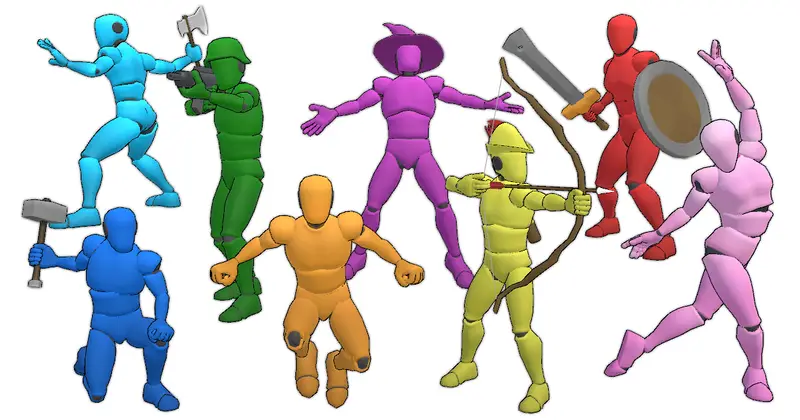
- Versatile Selection: Covers everything from victory dances, basic waves, and aggressive taunts to comedic drops.
- Clean Project Footprint: Well-organized asset structure makes importing only the clips you need fast and clutter-free.
Cons
- Stylized Motion Profile: The keyframing leans heavily into stylized exaggeration, which might look jarring on photorealistic, high-fidelity human models.
- No Built-in Sound FX: Sound design (whooshes, claps, footfalls) is not included and must be manually synced via Animation Events.
Asset Details & Specifications
| Category | 3D / Animations |
|---|---|
| Latest Version | v1.0.0 |
| File Size | 79.19 MB |
| Added to Platform | August 27, 2026 |
| Views | 7 views |
| Downloads | 6 downloads |
| Favourites | 0 favourites |
| Official Store | Buy Original License on Unity Asset Store → |
| Issue with Package? | Report Broken Link → |