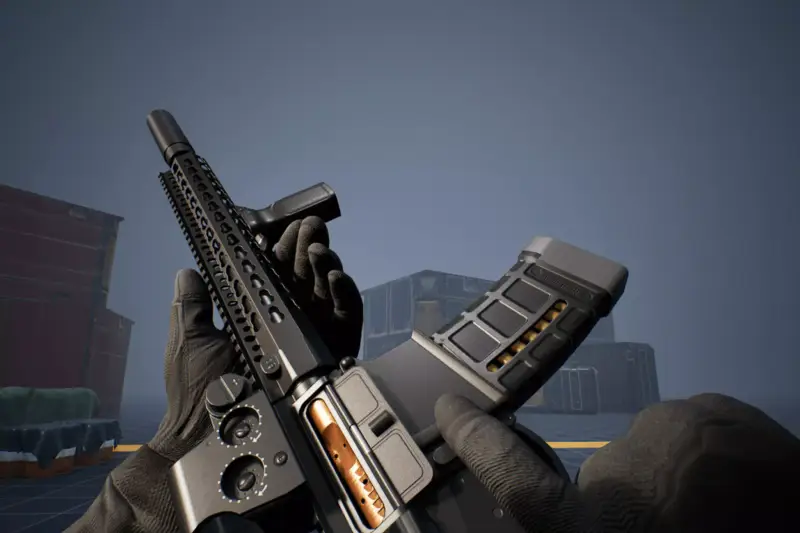
FPS Animation Ultimate
About FPS Animation Ultimate – Unity 3D Asset
FPS Animation Ultimate Unity Asset Overview
Having spent over eight years building first-person mechanics in Unity, I can tell you that getting gunplay to feel responsive, punchy, and fluid is one of the toughest challenges in action game development. You can code perfect hit-scan logic and particle trajectories, but if your view model animations feel stiff or detached, the entire experience falls flat. This is where FPS Animation Ultimate fits into a modern Unity production pipeline.
Rather than providing basic static clips, this asset delivers a complete view-model animation framework designed to handle the complex state blending required for modern first-person shooters. The system relies on a hybrid architecture: high-fidelity keyframe animation clips for complex actions (reloads, draws, mode switches) coupled with structural support for procedural spring motion (recoil, mouse sway, and movement bobbing). The core view model rig is configured using Unity’s Mecanim Animator Controller, making it straightforward to map state transitions directly to your character controller scripts.
Core Technical Features & Highlights
What sets this pack apart technically is its attention to view-model clipping issues, hand-IK positioning, and state machine cleanliness. Here is a breakdown of the core technical highlights built into the asset:
- Layered Animator State Machines: Weapon actions are divided cleanly across upper-body and arm layers. You can fire or reload while blending locomotion Blend Trees without breaking animation continuity.
- Procedural Sway & Recoil Hooks: The rig nodes are structured so that procedurally calculated offsets (such as mouse movement springs or procedural camera shake) can be applied directly to parent bone targets without overriding base keyframe data.
- Pre-Configured Animation Events: Clips include built-in
AnimationEventkeyframes for shell ejection timing, magazine detach/attach audio queues, and magazine swap instantiation. - Aim Down Sights (ADS) Alignment: Precision-aligned ADS transforms are pre-baked into the state machine, allowing smooth interpolation between hip-fire camera positioning and sight-aligned views.
- Render Pipeline Agnostic: Because the asset consists of Mecanim animations, rigs, and standard mesh configurations, it operates across the Universal Render Pipeline (URP), High Definition Render Pipeline (HDRP), and Built-in Render Pipeline without shader conversion friction.
Ideal Use Cases & Game Genres
While the title points straight to traditional First-Person Shooters, the modular nature of these clips and rigs makes them adaptable across several sub-genres:
1. Tactical & Hardcore Shooters
If you are building an extraction shooter or a tactical simulator, the weight and slow-blend transitions in the reload and inspection clips deliver the necessary physical grounding. The dual-hand IK layout makes it easy to adjust left-hand placement for foregrips, lasers, or suppressors.
2. Fast-Paced Arcade Action
For high-speed movement shooters, the state machines can be shortened with tighter cross-fade durations. The snappy draw and fire animations maintain visual clarity even when played back at 1.25x speed parameters in Mecanim.
3. Survival Horror & Story-Driven Adventures
The subtle idle motion, heavy breathing loops, and low-ammo state variations work exceptionally well for low-resource survival games where player tension is tied directly to weapon handling presentation.
Quick-Start Unity Setup & Integration Guide
Integrating FPS Animation Ultimate into an existing player controller script takes just a few steps. Follow this setup sequence to bind the view model state machine to your inputs:
Step 1: Weapon Camera Overlay Setup
To prevent view-model geometry from clipping into environment colliders, create a dedicated Weapon Camera stacked on top of your Main Camera. Assign your view-model rig to a specific layer (e.g., FPS_Arms) and exclude that layer from the Main Camera's culling mask.
Step 2: C# Animation Controller Script
Attach the following script to your view-model root object to control locomotion parameters, Aim Down Sights states, and recoil triggers:
using UnityEngine;

namespace FPSFramework
{
    [RequireComponent(typeof(Animator))]
    public class FPSViewModelController : MonoBehaviour
    {
        [Header("Animation Parameters")]
        [SerializeField] private string speedParam = "Speed";
        [SerializeField] private string adsParam = "IsAiming";
        [SerializeField] private string fireTrigger = "Fire";
        [SerializeField] private string reloadTrigger = "Reload";

        [Header("Procedural Sway Dynamics")]
        [SerializeField] private float swayIntensity = 0.015f;
        [SerializeField] private float maxSwayAmount = 0.04f;
        [SerializeField] private float swaySmoothing = 8.0f;

        private Animator viewAnimator;
        private Vector3 defaultLocalPos;

        private void Awake()
        {
            viewAnimator = GetComponent<Animator>();
            defaultLocalPos = transform.localPosition;
        }

        public void UpdateAnimatorValues(float moveMagnitude, bool isAiming)
        {
            // Damp parameters to prevent abrupt animation popping
            viewAnimator.SetFloat(speedParam, moveMagnitude, 0.1f, Time.deltaTime);
            viewAnimator.SetBool(adsParam, isAiming);
        }

        public void TriggerShoot()
        {
            viewAnimator.SetTrigger(fireTrigger);
        }

        public void TriggerReload()
        {
            viewAnimator.SetTrigger(reloadTrigger);
        }

        public void ApplyProceduralSway(Vector2 lookInput)
        {
            float targetX = Mathf.Clamp(-lookInput.x * swayIntensity, -maxSwayAmount, maxSwayAmount);
            float targetY = Mathf.Clamp(-lookInput.y * swayIntensity, -maxSwayAmount, maxSwayAmount);

            Vector3 finalSwayPosition = new Vector3(targetX, targetY, 0f);
            transform.localPosition = Vector3.Lerp(
                transform.localPosition,
                defaultLocalPos + finalSwayPosition,
                Time.deltaTime * swaySmoothing
            );
        }
    }
}
Pros & Cons Assessment
Here is my honest take on where this asset shines and where you might need to put in extra engineering effort:
- Pros:
- Production-Ready Polish: Animation curves feature realistic weight, secondary bone bounce, and keyframed momentum.
- Clean Hierarchy: Rig bones strictly follow standard FPS arm conventions, making it easy to attach custom 3D weapon models.
- Performance Efficient: Low runtime overhead; relies on standard Mecanim evaluation without heavy runtime physics solvers on lower-end devices.
- Cons:
- Rig Matching Required: If you are using custom, highly non-standard character arm meshes, you will need to re-target clips via Unity’s Animation Rigging or external DCC tools like Maya.
- Complex Animator Trees: The provided Animator Controllers are feature-packed, which means there is a slight learning curve when extending them for complex inventory systems.
Asset Details & Specifications
| Category | 3D / Animations |
|---|---|
| Latest Version | v3.4.0 (2 tracked releases) |
| File Size | 522.41 MB |
| Added to Platform | August 11, 2026 |
| Views | 14 views |
| Downloads | 10 downloads |
| Favourites | 1 favourites |
| Official Store | Buy Original License on Unity Asset Store → |
| Issue with Package? | Report Broken Link → |