Tactical FPS Animations
About Tactical FPS Animations – Unity 3D Asset
Tactical FPS Animations Unity Asset Overview
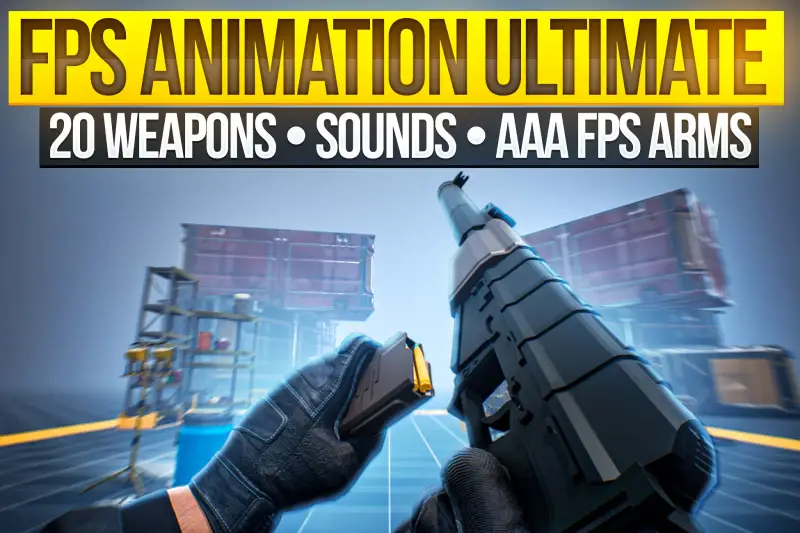
In my 8+ years building action titles in Unity, weapon handling is usually where first-person projects live or die. If the weight, sway, keyframing, and state transitions feel off by even a few milliseconds, the player immediately feels disconnected. The Tactical FPS Animations package tackles this precise problem by delivering a modular, production-ready set of military-grade first-person animations, complete with pose clips, weapon manipulation states, and rig setups ready for integration.
Architecturally, this asset acts as a bridge between high-fidelity keyframe animation and Unity's native Mecanim State Machine and Animation Rigging package. Rather than throwing hundreds of unorganized .fbx files at you, it structures clips into logical weapon categories (Rifles, Pistols, Shotguns, Launchers) with dedicated avatar masks and state transitions. Here is the key takeaway: it saves weeks of manual animation clean-up by providing clean bone hierarchies, realistic procedural weight feel, and frame-accurate timing events for audio and VFX triggers.
Core Technical Features & Highlights
When reviewing animation assets, I look straight at keyframe density, bone rotations, and how cleanly the clips blend under heavy movement. This package holds up remarkably well under technical scrutiny.
- Modular Arm Hierarchy: Built on standard FK/IK arm rigs, making it easy to swap custom glove textures, skin meshes, or full character models without breaking clip offsets.
- Frame-Accurate Animation Events: Every reload sequence comes pre-populated with Animation Events aligned to key frames (magazine drop, magazine insert, slide pull, bolt catch), allowing instant hooking into C# audio and particle systems.
- Layered Upper-Body Masks: Includes premade Avatar Masks allowing you to blend upper-body weapon handling seamlessly with lower-body locomotion scripts.
- Procedural Recoil & Inspection States: Weapon inspects, draw, holster, sprint transitions, and multiple tier recoil motions (fire single, burst, full auto) are keyframed with authentic weight distribution.
- Render Pipeline Agnostic: Because the asset consists of Mecanim controllers, mesh rigs, and clips, it works out-of-the-box across Built-in Render Pipeline, URP, and HDRP without shader conversion headaches.
Ideal Use Cases & Game Genres
Honestly, this set shines brightest when your project demands snappy, modern military responsiveness rather than floaty arcade mechanics. Here are the specific genres where it provides immediate value:
Tactical & Extraction Shooters
If you are building an extraction shooter or search-and-destroy title where reload times, weapon swaying, and ADS (Aim Down Sights) transitions directly affect gameplay tactics, the timing on these clips feels crisp and responsive.
Survival Horror
The deliberate keyframing on low-ammo checks, weapon malfunctions, and slow reloads fits tense survival gameplay perfectly. You can easily modify clip playback speeds in the Animator Window to reflect character panic or fatigue.
Co-Op Wave Shooters
The clear distinction between hip-fire, tactical reload, and full reload sequences allows for straightforward synchronization across multiplayer networking stacks like Mirror, Photon Fusion, or Netcode for GameObjects.
Quick-Start Unity Setup & Integration Guide
Setting up weapon animations can get messy if your state machine isn't structured cleanly. In my experience, driving parameters via hash IDs instead of strings keeps performance high and prevents runtime mistakes. Here is how to quickly integrate this set into your weapon controller system.
1. Animator Controller Layer Setup
Ensure your Animator component has a Base Layer for locomotion and an UpperBody_Weapon layer set to Override blending mode. Assign the included UpperBody_AvatarMask to the weapon layer so lower-body walking clips play concurrently without hitching.
2. Weapon State Listener Script
Attach this lightweight bridge script to your local player or weapon prefab to handle animation states and frame events cleanly:
using UnityEngine;

[RequireComponent(typeof(Animator))]
public class TacticalWeaponAnimator : MonoBehaviour
{
    private Animator animator;

    // Cache Animator Parameter Hashes for Performance
    private static readonly int IsAimingHash = Animator.StringToHash("IsAiming");
    private static readonly int FireTriggerHash = Animator.StringToHash("Fire");
    private static readonly int ReloadTriggerHash = Animator.StringToHash("Reload");
    private static readonly int MovementSpeedHash = Animator.StringToHash("Speed");

    [Header("Audio & VFX Hooks")]
    [SerializeField] private AudioSource weaponAudioSource;
    [SerializeField] private AudioClip magazineOutSound;
    [SerializeField] private AudioClip magazineInSound;
    [SerializeField] private ParticleSystem muzzleFlashVFX;

    private void Awake()
    {
        animator = GetComponent<Animator>();
    }

    public void UpdateLocomotion(float speed)
    {
        animator.SetFloat(MovementSpeedHash, speed);
    }

    public void SetAimState(bool isAiming)
    {
        animator.SetBool(IsAimingHash, isAiming);
    }

    public void TriggerFire()
    {
        animator.SetTrigger(FireTriggerHash);
        if (muzzleFlashVFX != null) muzzleFlashVFX.Play();
    }

    public void TriggerReload()
    {
        animator.SetTrigger(ReloadTriggerHash);
    }

    // --- ANIMATION EVENT CALLBACKS ---
    // These methods match the names assigned in the Animation Clip Inspector timeline.

    public void OnAnimEvent_MagOut()
    {
        if (weaponAudioSource && magazineOutSound)
            weaponAudioSource.PlayOneShot(magazineOutSound);
    }

    public void OnAnimEvent_MagIn()
    {
        if (weaponAudioSource && magazineInSound)
            weaponAudioSource.PlayOneShot(magazineInSound);
    }
}
Pros & Cons Assessment
No asset is perfect for every single production pipeline. Here is my honest technical breakdown of what works brilliantly and what requires extra work.
- Pros:
- Exceptional keyframe polish; motions carry realistic momentum, weight, and settling poses.
- Clean separation of weapon parts (magazines, charging handles) rigged specifically for accurate animated displacement.
- Massive time-saver for solo developers or small teams lacking a dedicated weapon animator.
- Includes essential auxiliary clips like weapon inspection, dynamic sprinting, and draw/holster transitions.
- Cons:
- Custom third-party weapon models may require manual bone re-targeting or offset adjustments using Two-Bone IK constraints.
- Some clips may require custom clipping plane tweaks on camera lenses with extremely wide FOV settings.
Asset Details & Specifications
| Category | 3D / Animations |
|---|---|
| Latest Version | v3.2.0 |
| File Size | 1.17 GB |
| Added to Platform | August 27, 2026 |
| Views | 9 views |
| Downloads | 5 downloads |
| Favourites | 1 favourites |
| Official Store | Buy Original License on Unity Asset Store → |
| Issue with Package? | Report Broken Link → |