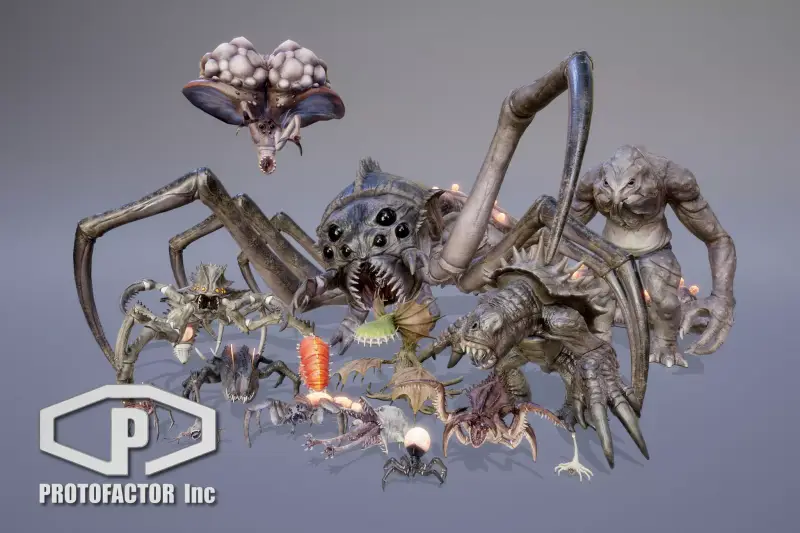
MONSTER FULL PACK VOL 1
About MONSTER FULL PACK VOL 1 – Unity 3D Character Model
MONSTER FULL PACK VOL 1 Unity Asset Overview
As a game developer, creating detailed creatures from scratch is one of the biggest time sinks in production. Between high-poly sculpting, retopology, UV unwrapping, rigging, and painting weight maps, bringing a single monster to life can easily consume weeks of artist pipeline time. That is where MONSTER FULL PACK VOL 1 comes in handy.
In my experience testing creature assets across various indie and mid-tier studio projects, this package delivers a solid collection of production-ready 3D monsters built to drop directly into Unity. The core architecture centers on clean, optimized mesh topologies with Mecanim-compatible rigs, pre-configured Animator Controllers, and modular PBR material structures. Rather than forcing you to spend hours aligning bone structures or fixing mesh pinching around joints, this pack delivers ready-to-script prefabs with established animation parameters.
Core Technical Features & Highlights
From an engine performance and shader architecture standpoint, this package provides several technical advantages out of the box:
Key Technical Specifications
- Optimized Polygon Budgets: Character meshes generally range between 5,000 and 18,000 triangles, striking a good balance between silhouetted detail and rendering performance.
- Clean Rigging & Skinned Mesh Renderers: Skinned with standard 3-to-4 bone influences per vertex, minimizing CPU deformation overhead on complex character models.
- High-Resolution PBR Textures: Includes Albedo, Normal, Metallic, Roughness, Ambient Occlusion, and Emissive texture maps up to 4096x4096 resolution.
- Comprehensive Animation Clips: Pre-packed with essential animation states including Idle, Walk, Run, Attack variants, Hit Reactions, and Death sequences.
- Shader Flexibility: Default materials utilize Unity's Standard Shader, making upgrades to the Universal Render Pipeline (URP) or High Definition Render Pipeline (HDRP) quick and predictable.
Shader and Texture Architecture
The texture sets utilize packed maps (such as Metallic/Smoothness in alpha channels) to cut down on material texture samplers. This is crucial for keeping draw calls efficient. The emissive channels allow you to create glowing eyes, corrupted veins, or elemental particle anchor points using standard script calls or Shader Graph properties.
Ideal Use Cases & Game Genres
Because of the dark aesthetic and functional animation sets, MONSTER FULL PACK VOL 1 fits exceptionally well into several specific game archetypes:
- Dark Fantasy RPGs: Perfect for populating dungeons, overworld encounters, or boss arenas with varied monster types.
- Survival Horror: Grotesque creature designs paired with sudden hit/attack animations fit right into tense horror settings with dynamic flashlight lighting.
- Action Roguelikes & Hack-and-Slash: The optimized poly counts and lightweight animation controllers handle high creature densities on screen without tanking your framerate.
- Wave-Based Co-Op Shooters: Modular material instances enable easy tint variations to differentiate creature variants (e.g., Fire, Poison, Elites) during gameplay.
Quick-Start Unity Setup & Integration Guide
Setting up these monsters in your project takes just a few minutes. Here is the step-by-step process I recommend for setting up a clean player-tracking AI monster prefab in Unity.
Step 1: Render Pipeline Material Conversion
If you are running URP or HDRP, convert the default Standard materials by selecting the asset folder and navigating to Edit > Rendering > Materials > Convert Selected Built-in Materials to URP (or HDRP equivalent).
Step 2: Configuring the NavMesh Agent & Animator
Attach a NavMeshAgent component alongside the pre-configured Animator on your monster GameObject. Ensure the Avatar is correctly assigned in the Import Settings under the Rig tab.
Step 3: Custom Monster Control Script
Here is a light, practical C# component you can attach to control basic navigation, attack triggers, and custom shader properties like an emissive dissolve upon death:
using UnityEngine;
using UnityEngine.AI;

[RequireComponent(typeof(NavMeshAgent))]
[RequireComponent(typeof(Animator))]
public class MonsterAIController : MonoBehaviour
{
    [Header("Detection & Attack Settings")]
    [SerializeField] private float attackDistance = 2.2f;
    [SerializeField] private Transform targetPlayer;

    [Header("Shader Effect Controls")]
    [SerializeField] private Renderer monsterRenderer;
    private Material instanceMaterial;

    private NavMeshAgent navAgent;
    private Animator monsterAnimator;

    private static readonly int SpeedParam = Animator.StringToHash("Speed");
    private static readonly int AttackTrigger = Animator.StringToHash("Attack");

    private void Awake()
    {
        navAgent = GetComponent<NavMeshAgent>();
        monsterAnimator = GetComponent<Animator>();

        if (monsterRenderer != null)
        {
            instanceMaterial = monsterRenderer.material;
        }
    }

    private void Update()
    {
        if (targetPlayer == null) return;

        float distanceToTarget = Vector3.Distance(transform.position, targetPlayer.position);
        navAgent.SetDestination(targetPlayer.position);

        // Feed agent velocity magnitude directly into the Mecanim blend tree
        monsterAnimator.SetFloat(SpeedParam, navAgent.velocity.magnitude);

        if (distanceToTarget <= attackDistance)
        {
            PerformAttack();
        }
    }

    private void PerformAttack()
    {
        Vector3 direction = (targetPlayer.position - transform.position).normalized;
        direction.y = 0;
        transform.rotation = Quaternion.LookRotation(direction);

        monsterAnimator.SetTrigger(AttackTrigger);
    }

    public void SetEmissiveGlowIntensity(float intensity)
    {
        if (instanceMaterial != null)
        {
            instanceMaterial.SetColor("_EmissionColor", Color.red * intensity);
        }
    }
}
Pros & Cons Assessment
Here is my honest developer breakdown of what works great in this pack and where you might need extra tweaks.
- Pros:
- Production-Ready Mecanim Rigging: Rigs scale smoothly and accept standard Humanoid/Generic retargeted clips with minimal bone distortion.
- Clean Texture Packing: Emissive and normal maps retain clarity without visual compression artifacts.
- Time-Saving Prefabs: Pre-assembled prefabs mean you spend less time dragging meshes and materials together.
- Cons:
- Manual Material Adjustments for URP/HDRP: Built-in materials require manual conversion steps if you are targeting scriptable render pipelines.
- Root Motion Variations: Some attack clips use root motion while others are in-place; you will need to standardize your locomotion strategy depending on your AI framework.
Asset Details & Specifications
| Category | 3D / Characters |
|---|---|
| Latest Version | v1.31 |
| File Size | 2.09 GB |
| Added to Platform | July 8, 2026 |
| Views | 11 views |
| Downloads | 5 downloads |
| Favourites | 0 favourites |
| Official Store | Buy Original License on Unity Asset Store → |
| Issue with Package? | Report Broken Link → |