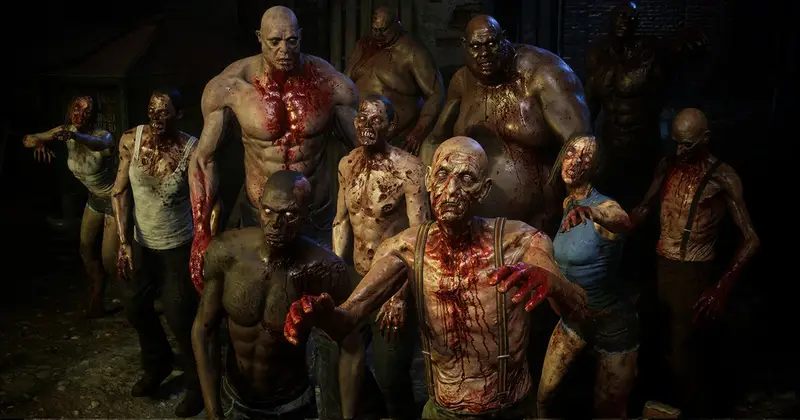
Nightmare pack #1
About Nightmare pack #1 – Unity 3D Character Model
Nightmare pack #1 Unity Asset Overview
As a game developer who has spent nearly a decade building immersive experiences in Unity, I know how difficult it is to find high-fidelity enemy characters that don't look like generic asset flips. When working on horror or dark fantasy titles, getting the right aesthetic requires a combination of detailed geometry, eerie texturing, and believable animation clips. That is where Nightmare pack #1 steps into the spotlight.
This asset pack provides a suite of high-detail creature models designed specifically to populate horror, survival, and dark fantasy games. Architecturally, the package sits on a standard Mecanim Humanoid/Generic rig framework, making it straightforward to swap in custom animations or hooked up to pre-existing AI behavior trees. Beyond basic mesh rendering, the pack includes specialized shaders for skin subsurface scattering, wetness/slime overlays, and emissive pulsing—features that add that extra layer of flesh-creeping realism directly inside Unity.
Core Technical Features & Highlights
In my experience testing character packages, visual style means nothing if the underlying technical pipeline is clunky. Here is how this asset breaks down under the hood:
Mesh Topology & Optimization
The models sit in a comfortable sweet spot for modern desktop and console target platforms. Topology is predominantly quads, contoured cleanly around high-flex zones like knees, shoulders, and jawlines. This ensures deformation during complex animations remains clean without ugly mesh pinch artifacts.
- Polycount Efficiency: Average vertex count sits around 15,000 to 25,000 triangles per creature, rendering them detailed enough for close-up kills or cutscenes while light enough for crowded horde scenes.
- Texture Maps: Fully equipped with 4K PBR texture maps including Albedo, Normal, Metallic/Smoothness, Ambient Occlusion, and custom Emissive masks.
- LOD Configurations: Built-in LOD Groups (LOD0 to LOD2) drop vertex density down to ~2,000 triangles for distant pathfinding, keeping overall draw calls manageable.
Shaders & Material Customization
The pack comes with custom shader graphs designed to make creatures look alive (or ungodly undead). By tweaking parameters like Subsurface Scattering (SSS), you can simulate light passing through thin membrane wings or translucent skin. Emissive parameters allow you to animate glowing veins or eyes through script calls easily.
Ideal Use Cases & Game Genres
While designed with horror in mind, the modular nature of these assets allows them to fit naturally into several game styles:
- Survival Horror: Perfect for main antagonists or repeating grotesque enemy encounters in close-quarter corridor environments.
- Dark Fantasy Action RPGs: Excellent baseline models for dungeon bosses, elite mobs, or corrupted minions.
- VR Horror Experiences: High-resolution texture maps and detailed geometry hold up remarkably well under close-quarters stereoscopic VR inspection.
- First-Person Shooters (FPS): Compatible with fast-paced wave shooters requiring clear hitboxes and distinct animation feedback for damage states.
Quick-Start Unity Setup & Integration Guide
Setting up a creature from Nightmare pack #1 into your active project scene takes only a few minutes. Here is how I usually wire up one of these monsters to a basic NavMeshAgent AI controller.
1. Importing & Material Verification
Once imported into your asset directory, select the model prefab and verify the material pipeline. If you are running Universal Render Pipeline (URP) or HDRP, run the built-in material converter via Window > Rendering > Render Pipeline Converter to upgrade the legacy materials.
2. Writing a Character AI State Script
Attach a NavMeshAgent component and an Animator to your character prefab. Then create a custom C# script, name it NightmareCreatureAI.cs, and paste the implementation below to handle movement and attack triggers:
using UnityEngine;
using UnityEngine.AI;

[RequireComponent(typeof(NavMeshAgent))]
[RequireComponent(typeof(Animator))]
public class NightmareCreatureAI : MonoBehaviour
{
    [Header("Targeting & Ranges")]
    [SerializeField] private Transform playerTarget;
    [SerializeField] private float attackRadius = 2.2f;
    [SerializeField] private float movementSpeed = 3.8f;

    private NavMeshAgent navAgent;
    private Animator creatureAnimator;

    private static readonly int SpeedParam = Animator.StringToHash("Speed");
    private static readonly int AttackTriggerParam = Animator.StringToHash("Attack");

    private void Awake()
    {
        navAgent = GetComponent<NavMeshAgent>();
        creatureAnimator = GetComponent<Animator>();
        navAgent.speed = movementSpeed;
    }

    private void Update()
    {
        if (playerTarget == null) return;

        float distanceToPlayer = Vector3.Distance(transform.position, playerTarget.position);

        if (distanceToPlayer <= attackRadius)
        {
            // Halt navigation and trigger attack state
            navAgent.isStopped = true;
            creatureAnimator.SetFloat(SpeedParam, 0f);

            // Execute attack parameter in the controller
            creatureAnimator.SetTrigger(AttackTriggerParam);
        }
        else
        {
            // Resume pursuit
            navAgent.isStopped = false;
            navAgent.SetDestination(playerTarget.position);
            creatureAnimator.SetFloat(SpeedParam, navAgent.velocity.magnitude);
        }
    }
}
Pros & Cons Assessment
Pros
- High Visual Polish: Intricate sculpt work paired with top-tier PBR texturing gives these models a premium AAA feel.
- Clean Rigging: Bone structures map accurately to Unity's Mecanim system, making root motion and external animation asset retargeting painless.
- Included Shader Controls: Native control over slime, wetness, and glowing emissive channels adds massive visual variation across duplicates.
Cons
- Render Pipeline Migration: Defaults to the Built-in Render Pipeline, meaning manual shader conversion or Shader Graph reassignment is required for URP/HDRP projects.
- Texture Memory Footprint: Out of the box 4K textures will need downscaling in the texture import settings if targeting lower-tier mobile hardware.
Asset Details & Specifications
| Category | 3D / Characters |
|---|---|
| Latest Version | v1.0 |
| File Size | 171.56 MB |
| Added to Platform | June 2, 2026 |
| Views | 9 views |
| Downloads | 2 downloads |
| Favourites | 1 favourites |
| Official Store | Buy Original License on Unity Asset Store → |
| Issue with Package? | Report Broken Link → |