Shiny Items VFX for URP
About Shiny Items VFX for URP – Unity VFX & Shader Pack
Shiny Items VFX for URP Unity Asset Overview
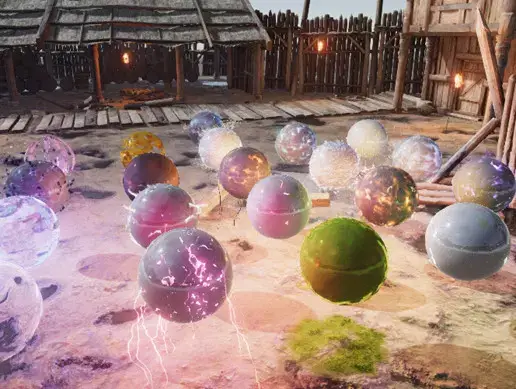
In game development, player satisfaction relies heavily on immediate feedback. When a player defeats an enemy or opens a chest, the loot lying on the ground needs to look enticing. Shiny Items VFX for URP provides a complete, light-weight visual and audio solution designed specifically for Unity's Universal Render Pipeline (URP). It eliminates the tedious work of manually building fresnel gleam shaders, spinning particle halos, and pickup sound triggers for every collectible in your project.
Architecturally, this asset combines Shader Graph shaders, modular particle systems, 3D item meshes (coins, gems, keys, health packs), and matching audio clips into clean prefabs. In my experience with production pipelines, having shaders natively authored in URP Shader Graph saves hours of re-node mapping. The visual FX rely on customized rim lighting, surface shine sweeps, and soft particle emissions that keep the draw-call footprint minimal while delivering distinct feedback for different item rarities.
Core Technical Features & Highlights
What makes this pack stand out is its balance between visual flair and performance efficiency. Here is a breakdown of what happens under the hood:
URP Native Shader Graph Customization
The asset uses a custom Shader Graph shader for metallic and non-metallic glossy surfaces. It calculates a dynamic specular gleam sweep controlled by UV scrolling and time properties. You can easily modify the rim lighting color, emission intensity, and shine frequency straight from the material inspector without touching code.
Modular Visual Effects & Particle Systems
Rather than relying on heavy, unoptimized particle setups, the included visual effects use lightweight Particle Systems combined with depth fading shaders. This prevents harsh visual clipping when items float near terrain, walls, or static mesh geometry.
- Rarity Preset System: Color-coded VFX presets tailored for Common, Rare, Epic, and Legendary items.
- Audio-Visual Cohesion: Prefabs feature embedded audio sources paired with sound clips calibrated to trigger alongside particle bursts.
- Optimized Mesh Assets: Lightweight 3D models with optimized vertex counts, ideal for rendering dozens of collectibles simultaneously on screen.
- Mobile Instancing Support: Shaders support GPU instancing out of the box, reducing batch counts on low-power devices.
Ideal Use Cases & Game Genres
Visual polish on loot items works across almost every genre, but this asset excels in specific production environments:
- Action RPGs & Dungeon Crawlers: Perfect for color-coding drops by rarity levels across dark dungeon floors.
- 3D Platformers & Collect-a-thons: Excellent for floating coins, stars, or keys that require high visibility and satisfying collection sounds.
- Mobile Hyper-Casual & Arcade Games: Optimized shaders and geometry ensure smooth framerates on lower-spec mobile hardware.
- Loot-Heavy First-Person Shooters: Clean rim-lit shaders help items stand out against complex, textured environments.
Quick-Start Unity Setup & Integration Guide
Integrating the asset into your project takes only a few minutes once your project is configured for URP. Here is a step-by-step setup guide to get your collectibles working with player interaction:
Step 1: Pipeline Check & Material Calibration
Ensure your project is set to URP via the Graphics Settings panel. If materials appear pink upon importing, open the target material in Unity, right-click, and select Reorganize / Re-assign to URP Shader Graph.
Step 2: Implementing the Item Collectible Controller
Attach a custom C# script to manage rotation, floating motion, and pickup triggers. Here is a production-ready component script you can drop onto your collectible prefabs:
using UnityEngine;

namespace GameDev.VFX
{
    [RequireComponent(typeof(Collider))]
    public class ShinyItemTrigger : MonoBehaviour
    {
        [Header("Floating & Rotation")]
        [SerializeField] private float rotationSpeed = 50f;
        [SerializeField] private float bobbingAmplitude = 0.15f;
        [SerializeField] private float bobbingFrequency = 2f;

        [Header("Feedback Effects")]
        [SerializeField] private GameObject pickupVFXPrefab;
        [SerializeField] private AudioClip pickupAudio;

        private Vector3 startPosition;

        private void Start()
        {
            startPosition = transform.position;

            // Ensure collider is set to trigger
            Collider col = GetComponent<Collider>();
            if (col != null)
            {
                col.isTrigger = true;
            }
        }

        private void Update()
        {
            // Rotate around the Y axis
            transform.Rotate(Vector3.up, rotationSpeed * Time.deltaTime, Space.World);

            // Sine wave bobbing movement
            float newY = startPosition.y + Mathf.Sin(Time.time * bobbingFrequency) * bobbingAmplitude;
            transform.position = new Vector3(transform.position.x, newY, transform.position.z);
        }

        private void OnTriggerEnter(Collider other)
        {
            if (other.CompareTag("Player"))
            {
                Collect();
            }
        }

        private void Collect()
        {
            // Spawn burst effect
            if (pickupVFXPrefab != null)
            {
                Instantiate(pickupVFXPrefab, transform.position, Quaternion.identity);
            }

            // Play pickup sound at position
            if (pickupAudio != null)
            {
                AudioSource.PlayClipAtPoint(pickupAudio, transform.position, 1.0f);
            }

            // Clean up item object
            Destroy(gameObject);
        }
    }
}
Pros & Cons Assessment
Pros
- Plug-and-Play Setup: Prefabs are pre-configured with materials, particles, and audio clips ready to drag into scenes.
- Shader Graph Flexibility: Colors, shine speed, specular strength, and glow parameters are fully exposed for tweaking.
- Performance Friendly: Low draw-call overhead makes it well-suited for high-density loot drops or mobile targets.
- Complete Package: Includes meshes, materials, visual effects, and matching SFX in one package.
Cons
- URP Exclusive: Shaders are native to URP Shader Graph and require conversion if you run the Built-in or HDRP render pipelines.
- Stylized Aesthetic: Included 3D models feature a stylized look, so realistic AAA projects will need to apply the materials to custom meshes.
Asset Details & Specifications
| Category | VFX / Shaders |
|---|---|
| Latest Version | v1.0 |
| File Size | 30.71 MB |
| Added to Platform | April 3, 2026 |
| Views | 3 views |
| Downloads | 2 downloads |
| Favourites | 0 favourites |
| Official Store | Buy Original License on Unity Asset Store → |
| Issue with Package? | Report Broken Link → |