Ultimate Preview 2 – Animator Add-on
About Ultimate Preview 2 – Animator Add-on – Unity Editor Tool & Plugin
Ultimate Preview 2 – Animator Add-on Unity Asset Overview
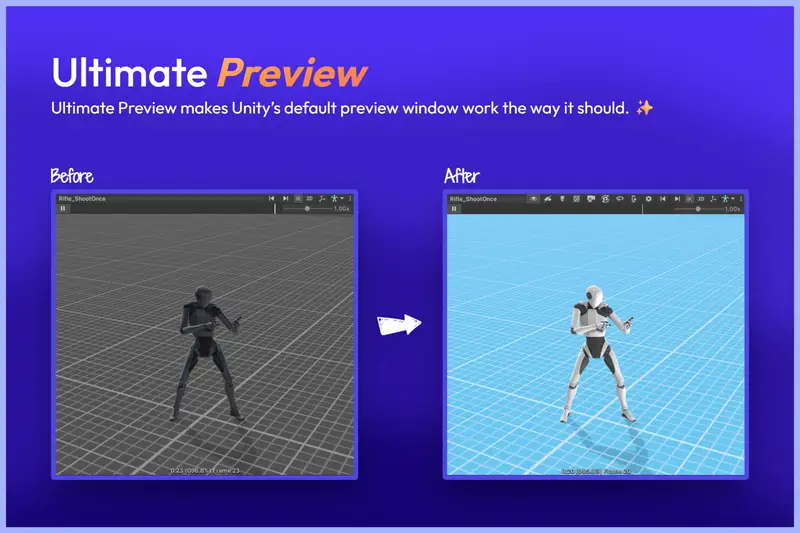
If you have spent any significant time building character-driven games in Unity, you know the single most frustrating bottleneck in character setup: testing complex Animator Controller state machines. In standard Unity workflows, verifying blend tree transitions, checking multi-layer avatar masks, or tuning animation events requires hitting Play, waiting for domain reloads, and manually navigating through character states. Ultimate Preview 2 – Animator Add-on fundamentally restructures this iteration cycle by bringing real-time previewing, timeline scrubbing, and state manipulation directly into the Edit Mode environment.
Architecturally, this tool acts as a lightweight wrapper over Unity’s low-level AnimationMode and EditorWindow APIs. It intercepts the target Animator component, isolates clip sampling, and exposes sub-state machine evaluators within the Scene View without mutating scene state or dirtying character prefabs. Honestly, for technical artists who regularly deal with nested state machines and intricate layer weight setups, removing the need for continuous Play Mode cycles changes the speed of character iteration entirely.
Core Technical Features & Highlights
The core philosophy of this tool is non-destructive edit-mode sampling. Here are the key technical highlights that stand out under practical editor conditions:
- Non-Destructive Edit-Mode Scrubbing: Sample dynamic blend trees, root motion trajectories, and multi-layer weights using a custom frame-accurate scrubber UI without altering underlying scene transforms.
- Animation Event Firing & Debugging: Trigger, inspect, and fine-tune step events, combat hitboxes, and audio cues frame-by-frame while keeping the Unity Scene View active.
- Multi-Layer & Avatar Mask Previews: Preview upper-body overrides, additive layers, and bone-masked pose blendings in real time without needing custom runtime test harnesses.
- Zero Runtime Build Footprint: Built entirely as an Editor script suite under an
Editor/folder tree, ensuring zero memory overhead or code clutter in production builds. - Pipeline Agnostic Compatibility: Operates entirely on the
TransformandSkeletonevaluation level, offering seamless support across Built-in Render Pipeline, URP, and HDRP without custom shader dependencies.
Ideal Use Cases & Game Genres
In my experience, certain genres benefit significantly more from frame-accurate preview tooling than others. This asset shines brightest in project types that rely heavily on tight animation synchronization:
1. Fighting Games & Action RPGs
Precision hitboxes, cancel windows, and invincibility frames require exact frame timings. Being able to scrub frame-by-frame while visualizing attack volumes in the Scene View allows technical animators to match colliders to mesh swings down to the exact millisecond.
2. Complex Cinematic Cutscenes & Timelines
When syncing character gestures to dialogue tracks or environmental cues outside of standard Sequencer setups, scrub-previewing complex dynamic layers saves hours of continuous Play Mode restarts.
3. Third-Person Locomotion Systems
Tuning 2D Freedom Directional blend trees (such as idle-to-sprint vector transitions) is notoriously slow in standard Unity. Previewing parametric blend trees directly on scene geometry allows immediate visual feedback for foot sliding and weight balance.
Quick-Start Unity Setup & Integration Guide
Integrating Ultimate Preview 2 – Animator Add-on into your workflow is quick and simple. Follow these steps to set up your character preview setup:
- Import the asset package into your Unity project. Ensure all scripts reside in an Editor directory.
- Select your character GameObject in the Scene hierarchy containing an active
Animatorcomponent. - Open the preview utility via the top menu bar:
Tools > Ultimate Preview > Animator Controller. - Dock the preview window alongside your Inspector or Scene View for easy access.
Here is a practical developer code snippet demonstrating how you can extend the preview context or write a custom editor driver using Unity's AnimationMode API to drive parameters programmatically during edit-mode testing:
using UnityEngine;
using UnityEditor;

[CustomEditor(typeof(Animator))]
public class CustomAnimatorPreviewDriver : Editor
{
    private float _previewTime;
    private AnimationClip _targetClip;

    public override void OnInspectorGUI()
    {
        // Render standard Animator UI
        DrawDefaultInspector();

        Animator animator = (Animator)target;

        EditorGUILayout.Space(10);
        EditorGUILayout.LabelField("Custom Scrubber Extensions", EditorStyles.boldLabel);

        _targetClip = (AnimationClip)EditorGUILayout.ObjectField("Preview Clip", _targetClip, typeof(AnimationClip), false);

        if (_targetClip != null)
        {
            EditorGUI.BeginChangeCheck();
            _previewTime = EditorGUILayout.Slider("Time (Seconds)", _previewTime, 0f, _targetClip.length);

            if (EditorGUI.EndChangeCheck())
            {
                EvaluateEditModeSample(animator.gameObject, _targetClip, _previewTime);
            }
        }
    }

    private static void EvaluateEditModeSample(GameObject targetGo, AnimationClip clip, float time)
    {
        if (targetGo == null || clip == null) return;

        // Enter Editor Animation Sampling Mode safely
        AnimationMode.StartAnimationMode();
        AnimationMode.BeginSampling();
        AnimationMode.SampleAnimationClip(targetGo, clip, time);
        AnimationMode.EndSampling();

        // Repaint views to reflect transform shifts instantly
        SceneView.RepaintAll();
    }

    private void OnDisable()
    {
        // Revert temporary Editor transform overrides
        if (AnimationMode.InAnimationMode())
        {
            AnimationMode.StopAnimationMode();
        }
    }
}
Pros & Cons Assessment
Pros
- Unmatched Workflow Acceleration: Eliminates domain reloads completely when tuning Mecanim parameters and layer weights.
- Clean Scene Isolation: Preview samples leave no lingering dirty transforms or uncommitted changes on character scene prefabs when closed.
- Intuitive UI Integration: Fits cleanly into Unity's existing Editor style, feeling like a native component rather than a shoehorned add-on.
- Event Inspection: Allows inspecting precise frame data for Unity Animation Events without running game logic loops.
Cons
- Complex IK Rig Conflicts: Highly custom, script-driven runtime IK solvers (like specialized procedural foot placement) may require manual edit-mode execution hooks to respond while scrubbing animations.
- Initial Binding Step: When working with multi-rig character setups, you must ensure the active avatar context is correctly bound in the tool inspector panel.
Asset Details & Specifications
| Category | Tools / Utilities |
|---|---|
| Latest Version | v2.0.4 (2 tracked releases) |
| File Size | 3.90 MB |
| Added to Platform | May 9, 2026 |
| Views | 5 views |
| Downloads | 3 downloads |
| Favourites | 0 favourites |
| Official Store | Buy Original License on Unity Asset Store → |
| Issue with Package? | Report Broken Link → |