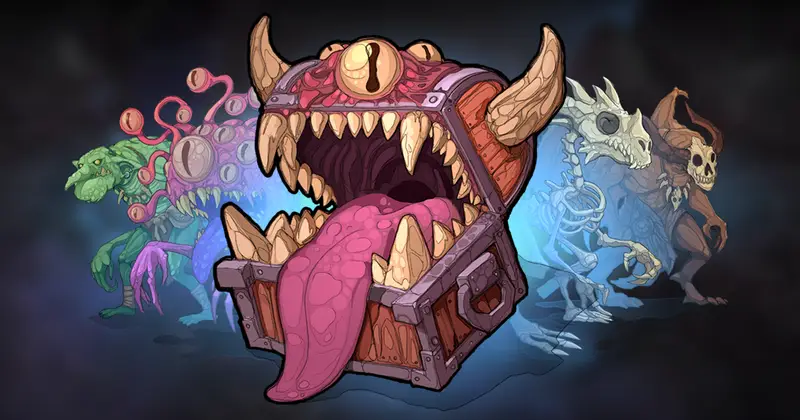
2D Character Pack Vol 4
About 2D Character Pack Vol 4 – Unity 2D & UI Pack
2D Character Pack Vol 4 Unity Asset Overview
As a senior developer who has spent over eight years building and optimizing mobile and desktop games in Unity, I often see indie projects hit a massive roadblock during early asset pipeline design. When building 2D games, balancing distinct visual art with light draw-call overhead and dynamic customizability is surprisingly tough. The 2D Character Pack Vol 4 addresses this exact bottleneck by delivering a clean, modular set of 2D character assets with a sharp, geometric "low-poly" aesthetic converted into crisp 2D sprite sheets and bone-rigged structures.
In my experience, many art packs either give you flat static frames that bloat your build size or overly complex 3D models masquerading as 2D. This pack takes a pragmatic middle ground: it utilizes optimized Sprite Atlases combined with Unity's native 2D Animation framework (including Sprite Library and Sprite Resolver components). This architecture allows you to easily swap weapons, headgear, and armor layers at runtime without re-instantiating game objects or breaking batching efficiency.
Core Technical Features & Highlights
Architectural flexibility is crucial when dealing with 2D character pipelines. Let's look at the primary engine-level highlights that make this asset pack technically sound:
- Skeletal 2D Rigging: Features fully rigged bone hierarchies compatible with Unity's official 2D Animation package, allowing you to reuse Mecanim
AnimatorControllersacross multiple character skins. - Runtime Modular Customization: Native support for
Sprite Library Assets, enabling plug-and-play swapping of armor pieces, weapons, and color palettes via simple API calls. - URP 2D Light Compatibility: Sprite maps come pre-configured with secondary texture maps (including secondary Normal Maps), allowing characters to react realistically to dynamic
Light2Dnodes inside the Universal Render Pipeline (URP). - Draw-Call Efficiency: Packed efficiently into standardized texture sizes (2048x2048) to ensure high-density Sprite Atlas batching and minimal state changes on mobile GPUs.
Technical Specifications Breakdown
Here is a quick overview of how the technical footprint looks inside a fresh Unity project:
- Texture Resolution: 2048x2048 Atlases (Compressed RGBA 32-bit / PVRTC/ASTC optimized).
- Rigging Standard: Unity 2D Bone Hierarchy with pre-mapped weight painting.
- Render Pipelines Supported: Built-In Render Pipeline, URP (2D Renderer), and HDRP (via custom unlit/lit 2D shaders).
- Animation Count: Includes core state machine loops (Idle, Walk, Run, Attack, Hit, Death).
Ideal Use Cases & Game Genres
The geometric low-poly art style applied to a 2D workflow gives this asset a distinct personality. Honestly, it fits best in projects where visual clarity and fast performance are required simultaneously.
Here are the genres where this pack shines the brightest:
- Top-Down & Isometric Action RPGs: Perfect for hack-and-slash or dungeon crawler games requiring distinct enemy tiers and customizable hero gear.
- 2D Side-Scrollers & Roguelikes: The pre-built skeletal animations handle fast-paced platformer mechanics seamlessly without micro-stutters.
- Hyper-Casual & Hybrid-Casual Mobile Titles: Excellent runtime efficiency ensures stable 60 FPS performance even on lower-end Android and iOS devices.
- Turn-Based Tactical Games: High visual clarity allows players to easily distinguish different units on a crowded tactical grid.
Quick-Start Unity Setup & Integration Guide
Integrating these character rigs into your production loop is straightforward. Follow these steps to get your first character fully functional with custom script-based gear switching.
Step 1: URP 2D Pipeline Configuration
Ensure you have the 2D Animation package installed via the Unity Package Manager. If you are running URP, make sure your Active Render Pipeline Asset uses the 2D Renderer Data asset. This enables support for Sprite-Lit-Default shaders and normal maps.
Step 2: Implementing Dynamic Gear Swapping via C#
To switch weapons or armor at runtime using Unity's SpriteResolver, attach the following C# script to your character root prefab. This setup eliminates the need to manually manipulate individual SpriteRenderer references.
using UnityEngine;
using UnityEngine.U2D.Animation;

[RequireComponent(typeof(Animator))]
public class EquipmentSwapper : MonoBehaviour
{
    [Header("Sprite Resolvers")]
    [SerializeField] private SpriteResolver mainHandResolver;
    [SerializeField] private SpriteResolver helmetResolver;

    [Header("Library Categories")]
    [SerializeField] private string weaponCategory = "Weapons";
    [SerializeField] private string helmetCategory = "Helmets";

    /// <summary>
    /// Call this method to change the character's equipped weapon at runtime.
    /// </summary>
    public void SwapWeapon(string entryName)
    {
        if (mainHandResolver == null)
        {
            Debug.LogWarning("EquipmentSwapper: Main Hand Resolver is missing!");
            return;
        }

        // Sets the entry inside the assigned Sprite Library Asset
        mainHandResolver.SetCategoryAndEntry(weaponCategory, entryName);
        mainHandResolver.ResolveSpriteToSpriteRenderer();
    }

    /// <summary>
    /// Call this method to update the helmet visual layer.
    /// </summary>
    public void SwapHelmet(string entryName)
    {
        if (helmetResolver == null) return;

        helmetResolver.SetCategoryAndEntry(helmetCategory, entryName);
        helmetResolver.ResolveSpriteToSpriteRenderer();
    }
}
Step 3: Animator State Machine Mapping
The asset comes with preset AnimationClip files. Hook these clips into a standard Unity AnimatorController using a Blend Tree for movement (Idle -> Walk -> Run) and Trigger parameters for actions like "Attack" or "TakeDamage".
Pros & Cons Assessment
- Pros:
- Highly optimized atlas layouts significantly reduce GPU memory bandwidth.
- Modular bone hierarchy makes creating new customized animations straightforward.
- Pre-configured
SpriteLibraryassets save hours of manual sprite assignment. - Distinct low-poly 2D style stands out compared to generic vector art packs.
- Cons:
- If your project requires standard frame-by-frame raster sprites without rigging, stripping out the skeletal bones takes extra setup time.
- Mixing this specific geometric aesthetic with soft, painted environmental assets can cause visual inconsistency unless planned carefully.
Asset Details & Specifications
| Category | 2D / Characters |
|---|---|
| Latest Version | v1.0 |
| File Size | 108.83 MB |
| Added to Platform | February 11, 2026 |
| Views | 7 views |
| Downloads | 0 downloads |
| Favourites | 0 favourites |
| Issue with Package? | Report Broken Link → |