AAA Stylized Projectiles Vol.1
About AAA Stylized Projectiles Vol.1 – Unity VFX & Shader Pack
AAA Stylized Projectiles Vol.1 Unity Asset Overview
I have lost count of how many visual effects packs look stunning in pre-rendered video trailers but completely crumble the moment you stress-test them in an actual gameplay loop. Stylized combat visual effects in particular are tricky: if the shaders rely heavily on unoptimized dynamic lighting or unpooled mesh particles, your draw call count skyrockets on middle-tier mobile devices and modern handheld consoles.
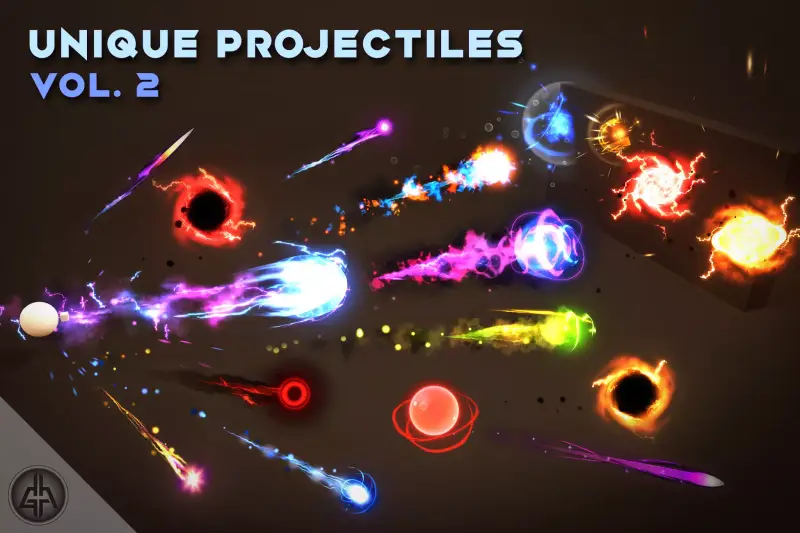
AAA Stylized Projectiles Vol.1 tackles this exact architectural challenge. Instead of piling on heavy rendering tricks, this pack uses lightweight, high-impact combination setups: custom vertex-displacement shaders, tightly calibrated ParticleSystem modules, and low-poly visual meshes. From a code architecture perspective, the asset structures every effect into modular, clean prefab hierarchies composed of three distinct execution phases: the initial muzzle flash, the traveling projectile with custom particle trails, and the terminal impact visual. This separation makes it straightforward to decouple visual triggers from your underlying gameplay scripts.
Core Technical Features & Highlights
Honestly, the real highlight here is how the pack balances AAA visual fidelity with modern pipeline flexibility. Below are the key technical features driving this pack:
- Universal Render Pipeline (URP) & Built-In Support: The visual effects ship with shaders authored for URP Shader Graph while maintaining backward compatibility for the Built-In Render Pipeline. Upgrading textures and materials across color spaces (Linear vs Gamma) requires minimal visual adjustment.
- Custom Vertex Animation Shaders: Instead of relying on expensive runtime physics or heavy mesh deformations, key projectile motions—such as stylized energy swirls or fire ripples—are driven directly inside the vertex shader using vertex displacement and scrolling UV noise textures.
- GPU Instancing & Custom Vertex Streams: The particle systems pass dynamic color, alpha fading, and custom custom curve data directly to particle shaders via Custom Vertex Streams, allowing batches of projectiles to share draw calls efficiently.
- Decoupled Component Structures: Particle systems, light sources, and trail renderers are kept in distinct sub-child objects. This structure allows developers to easily strip dynamic lights or heavy sub-emitters for lower-end hardware configurations without breaking the core visual effect.
Ideal Use Cases & Game Genres
Here is the key takeaway: while the visual style leans heavily toward stylized, vibrant aesthetics, the underlying tech translates smoothly across multiple project scales and genres:
- Top-Down Action RPGs & Hack-and-Slash: Perfect for skill-shot magic bolts, elemental arrows, and boss attack patterns where high readability from an isometric camera angle is mandatory.
- Hero Shooters & Arcade FPS: High-velocity energy blasts and laser beams read cleanly in fast-paced first-person or third-person combat scenarios without obscuring the player's primary field of view.
- Mobile Battle Royales & Casual Arena Fighters: The efficient draw-call footprint and lightweight shader math make these projectiles viable for target frame rates on mid-range Android and iOS devices.
Quick-Start Unity Setup & Integration Guide
Integrating these projectiles into an existing combat codebase requires minimal boilerplate. Instead of directly calling Instantiate() and Destroy()—which triggers garbage collection spikes—it is best practice to drive these prefabs through an object pooling script.
1. Projectile Velocity & Impact Handler Script
Attach the following C# script to your root projectile prefab. It manages forward motion, handles collision triggers, and decouples the impact particle system upon hit:
using UnityEngine;

[RequireComponent(typeof(Rigidbody))]
public class StylizedProjectile : MonoBehaviour
{
    [Header("Movement Settings")]
    [SerializeField] private float speed = 35f;
    [SerializeField] private float maxLifetime = 4f;

    [Header("Impact Visuals")]
    [SerializeField] private GameObject impactEffectPrefab;

    private Rigidbody rb;
    private float currentLifetime;

    private void Awake()
    {
        rb = GetComponent<Rigidbody>();
        rb.useGravity = false;
        rb.collisionDetectionMode = CollisionDetectionMode.ContinuousSpeculative;
    }

    private void OnEnable()
    {
        currentLifetime = 0f;
        rb.velocity = transform.forward * speed;
    }

    private void Update()
    {
        currentLifetime += Time.deltaTime;
        if (currentLifetime >= maxLifetime)
        {
            Deactivate();
        }
    }

    private void OnTriggerEnter(Collider other)
    {
        // Avoid self-collision checks or trigger zones if necessary
        if (other.isTrigger) return;

        if (impactEffectPrefab != null)
        {
            Quaternion impactRotation = Quaternion.LookRotation(-transform.forward);
            Instantiate(impactEffectPrefab, transform.position, impactRotation);
        }

        Deactivate();
    }

    private void Deactivate()
    {
        rb.velocity = Vector3.zero;
        gameObject.SetActive(false);
    }
}
2. Tuning Component Parameters
When attaching this script, ensure your projectile prefab contains a SphereCollider or CapsuleCollider configured with isTrigger = true. For optimal physics performance, set the projectile's Rigidbody collision detection mode to ContinuousSpeculative to prevent high-speed projectiles from passing through thin geometry wall colliders between frames.
Pros & Cons Assessment
- Pros:
- Visually crisp, punchy AAA art style with strong color saturation and clear silhouettes.
- Production-ready object structure; easy to strip dynamic lights or disable heavy trail components for mobile scaling.
- Well-optimized shader setup utilizing UV noise panning over expensive runtime rendering passes.
- Clean hierarchy separation between muzzle flashes, traveling projectiles, and impact effects.
- Cons:
- Shaders may require standard visual adjustments if your project relies heavily on customized screen-space post-processing pipelines.
- High projectile counts on screen may still require turning off real-time point lights attached to individual bullet prefabs on low-end mobile chips.
Asset Details & Specifications
| Category | VFX / Particles |
|---|---|
| Latest Version | v5.0.2 (2 tracked releases) |
| File Size | 43.96 MB |
| Added to Platform | June 8, 2026 |
| Views | 4 views |
| Downloads | 4 downloads |
| Favourites | 0 favourites |
| Official Store | Buy Original License on Unity Asset Store → |
| Issue with Package? | Report Broken Link → |