Stylized VFX Bundle
About Stylized VFX Bundle – Unity VFX & Shader Pack
Stylized VFX Bundle Unity Asset Overview
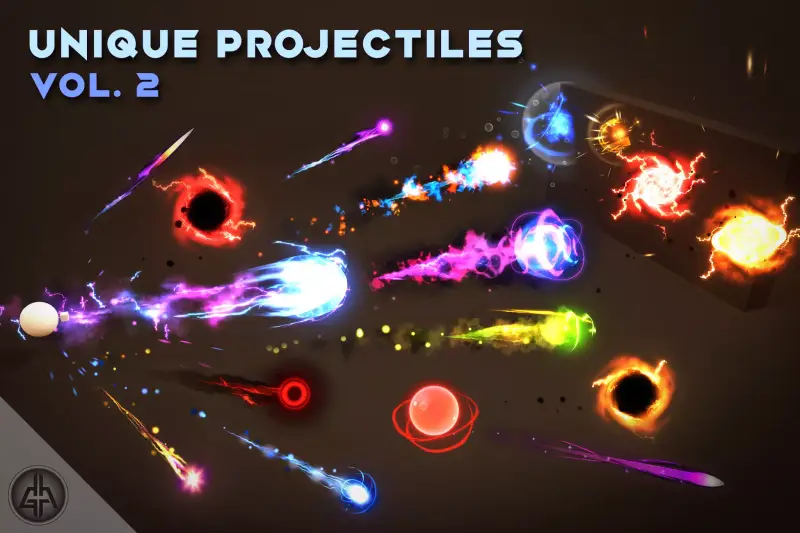
In my experience, building punchy stylized visual effects from scratch is one of the most time-consuming tasks in Unity. It is never just about spawning particles; you need custom mesh geometry, hand-drawn sprite flipbooks, tailored shaders with noise-driven erosion, and smooth dynamic alpha blending. The Stylized VFX Bundle tackles this exact challenge by providing a comprehensive suite of production-ready particle prefabs, shaders, and low-poly meshes designed for immediate drop-in usability.
Architecturally, this asset relies heavily on Unity's Shuriken Particle System paired with custom Shader Graph shaders. Rather than cluttering your project with heavy high-resolution textures, the bundle relies on smart vertex manipulation, procedural UV scrolling, and compact noise textures. This architectural choice keeps GPU memory footprints exceptionally light while maintaining a vibrant, hand-crafted anime aesthetic across combat strikes, environmental magic, and ambient atmospheric effects.
Core Technical Features & Highlights
When dissecting the asset under the hood, several technical choices stand out that make it particularly friendly for real-time mobile and desktop projects.
Shader Architecture & Vertex Distortion
The core shaders are built targeting the Universal Render Pipeline (URP) while offering backwards compatibility for the Built-In Render Pipeline. The shaders utilize a custom alpha-clipping and dissolve model driven by grayscale noise maps. Key features include:
- Custom Vertex Data Channels: Particles pass custom lifetime parameters directly into shader inputs via vertex streams, allowing localized color shifts and edge-glow intensity scaling over time without requiring separate material instances.
- Depth-Fade Integration: Soft particle intersections are enabled out of the box using depth buffer sampling, preventing rigid geometry clippings against ground terrain or walls.
- Procedural Rim & Distortion: Built-in billboarding and screen-space UV offset distortion for atmospheric heat haze and shockwave rings.
Particle System Optimization
To ensure steady frame rates during intense combat scenes, the prefabs make heavy use of optimized geometry. Slashes and impact arcs use low-poly 3D cone and ribbon meshes rather than dense quad stacks. Furthermore, GPU Instancing is pre-configured on all mesh particles to draw massive bursts with minimal overhead.
Ideal Use Cases & Game Genres
Honestly, the visual style of this bundle sits right in the sweet spot for games requiring clear, crisp, and readable feedback loops. Here is where I have seen this setup perform best:
- Stylized Action RPGs & Hack-and-Slash: Sword trails, elemental elemental hits (fire, ice, lightning), and area-of-effect (AoE) magic circles look sharp without obscuring enemy animations.
- Mobile Battle Royales & Hero Shooters: The low draw-call profile makes it an ideal fit for mobile titles where performance budgets are strict but visual clarity is non-negotiable.
- Anime-Inspired Fighting Games: Rapid multi-hit strikes benefit from the bundled high-contrast impact bursts and trailing arc slashes.
- Hyper-Casual & Arcade Games: Vibrant colors and punchy impact feedback instantly upgrade basic mechanic rewards and level transitions.
Quick-Start Unity Setup & Integration Guide
Integrating this asset into an active production branch is straightforward. Follow these core steps to set up your project pipeline correctly.
1. Render Pipeline Verification
Before dragging prefabs into your scene, ensure your project's pipeline matches the asset materials. If you are using URP, navigate to Edit > Render Pipeline > Universal Render Pipeline and run the material upgrader if any default pink fallback shaders appear on initial import.
2. Dynamic Scripting & Dynamic Spawning
To avoid garbage collection spikes during runtime, avoid repeatedly instantiating and destroying particle prefabs. Instead, control emission through a pooled script architecture. Here is a production-grade trigger listener pattern you can use to spawn, colorize, and auto-cleanup effects from code:
using UnityEngine;

public class VFXImpactController : MonoBehaviour
{
    [Header("VFX Prefab References")]
    [SerializeField] private ParticleSystem impactVfxPrefab;
    [SerializeField] private Color mainGlowColor = Color.cyan;

    /// <summary>
    /// Spawns impact effect aligned with point of collision and aligns to surface normal.
    /// </summary>
    public void SpawnImpact(Vector3 hitPoint, Vector3 surfaceNormal)
    {
        if (impactVfxPrefab == null) return;

        Quaternion rotation = Quaternion.LookRotation(surfaceNormal);
        ParticleSystem vfxInstance = Instantiate(impactVfxPrefab, hitPoint, rotation);

        // Customize dynamic parameters via particle main module
        var mainModule = vfxInstance.main;
        mainModule.stopAction = ParticleSystemStopAction.Destroy;
        mainModule.startColor = new ParticleSystem.MinMaxGradient(mainGlowColor);

        // Execute system with hierarchy children included
        vfxInstance.Play(true);
    }
}
Pros & Cons Assessment
- Pros:
- High Visual Variety: Broad coverage ranging from basic elemental hits to full ambient magic fields.
- Performance First: Low polygon counts on mesh-based particles with shared atlases for tight draw call budgets.
- Easy Customization: Color gradients and noise scales exposed nicely on top-level prefab components.
- Cons:
- Non-PBR Design: The toon/stylized aesthetic will not blend well into high-end realistic visual directions.
- Manual Pipeline Conversion: Switching custom Shader Graph nodes between Built-In and URP sometimes requires manual node reconnects if upgrading legacy projects.
Asset Details & Specifications
| Category | VFX / Particles |
|---|---|
| Latest Version | v1.0.1 |
| File Size | 225.46 MB |
| Added to Platform | June 21, 2026 |
| Views | 20 views |
| Downloads | 8 downloads |
| Favourites | 2 favourites |
| Official Store | Buy Original License on Unity Asset Store → |
| Issue with Package? | Report Broken Link → |