DarkSorceress AnimSet
About DarkSorceress AnimSet – Unity 3D Asset
DarkSorceress AnimSet Unity Asset Overview
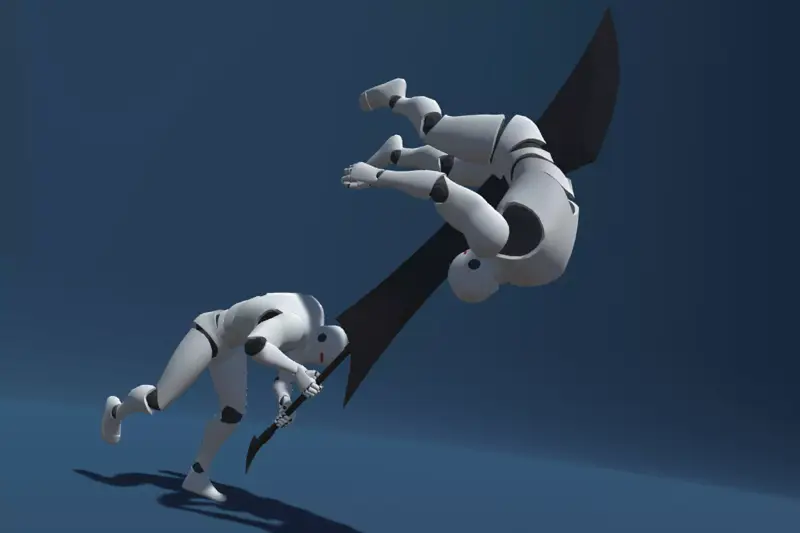
In my experience building action RPGs and third-person fantasy titles, finding a cohesive animation pack for magic-focused characters is surprisingly tough. Most asset packages give you basic projectile casts, but they fall short when you need realistic casting weight, channeled spells, dynamic hits, and combat locomotion. The DarkSorceress AnimSet addresses this exact gap by delivering a dedicated suite of motion-captured and keyframed animations targeted specifically at dark fantasy spellcasters.
Architecturally, this asset relies entirely on Unity's Mecanim Humanoid Rig system. The clips are authored with consistent root orientation and offer both Root Motion and In-Place variations. This dual-setup allows you to choose between physics-driven character controller velocity or direct Root Motion movement without breaking animation fidelity. The key takeaway here is structural consistency: bone naming conventions, finger articulation, and hand socket positioning are standardized across the entire set, minimizing retargeting headache when swapping character meshes.
Core Technical Features & Highlights
Here is a technical breakdown of what makes this animation package stand out during production implementation:
- Complete Modular Spell Phases: Spells are split into
Windup,Loop/Charge,Release, andRecoveryclips. This granular split lets you hook variable-length spell casting directly into C# logic without manual frame trimming. - Full Humanoid Avatar Compatibility: Every motion file maps cleanly to standard Unity Humanoid Avatars, making retargeting to custom character models straightforward.
- Upper-Body Layer Readiness: Motion curves for finger gestures and upper-body torsos are isolated smoothly, allowing you to run upper-body casting clips over lower-body running or walking locomotion using Avatar Masks.
- Dual Locomotion Sets: Includes relaxed ambient locomotion alongside aggressive combat-ready combat-strafe motion sets (forward, backward, left, right strafes).
- Impact & Death Sequences: Includes multi-directional hit reactions (front, back, left, right) and dramatic death falls tailored to a fragile caster silhouette.
Ideal Use Cases & Game Genres
Honestly, this set shines brightest when implemented in dark fantasy settings where magical casting needs to look aggressive and menacing rather than lighthearted. Here are the primary genres where I recommend dropping this asset into your pipeline:
1. Isometric & Action RPGs (ARPGs)
If you are developing a top-down or isometric hack-and-slash title similar to Diablo or Grim Dawn, the distinct hand gestures and readable silhouettes translate exceptionally well from elevated camera angles.
2. Third-Person Action/Soulslike Games
The clear windup and recovery frames across combat spells make this ideal for combat systems that rely heavily on telegraphed enemy or player attacks, stamina management, and precise parry/dodge windows.
3. Multiplayer Hero Brawlers & Arenas
The inclusion of clean hit reactions, stun loops, and distinct ultimate-ability casting clips makes it simple to integrate into networked state machines using frameworks like Photon Fusion or Unity Netcode for GameObjects.
Quick-Start Unity Setup & Integration Guide
Integrating the DarkSorceress AnimSet into your project takes roughly ten minutes if your character avatar is already set up. Here is the step-by-step developer workflow I follow:
- Set the asset folder's rig type to Humanoid in the Asset Inspector, ensuring the Source Avatar matches your project's base setup.
- Create an Animator Controller and define an upper-body layer named
UpperBody_Castingwith an Avatar Mask masking out the hip and leg bones. - Set the upper-body layer blending mode to Override or Additive depending on whether you want complete arm override or motion blending.
- Attach the following lightweight controller script to your character GameObject to handle state transitions:
using UnityEngine;

[RequireComponent(typeof(Animator))]
public class DarkSorceressAnimBridge : MonoBehaviour
{
    private Animator _animator;

    // Hash parameters for performance optimization
    private static readonly int SpeedHash = Animator.StringToHash("Speed");
    private static readonly int IsCastingHash = Animator.StringToHash("IsCasting");
    private static readonly int SpellIDHash = Animator.StringToHash("SpellID");
    private static readonly int TriggerCastHash = Animator.StringToHash("TriggerCast");

    private void Awake()
    {
        _animator = GetComponent<Animator>();
    }

    public void UpdateLocomotion(float movementSpeed)
    {
        _animator.SetFloat(SpeedHash, movementSpeed, 0.1f, Time.deltaTime);
    }

    public void InitiateSpellcast(int spellIdentifier, bool isChanneled)
    {
        _animator.SetInteger(SpellIDHash, spellIdentifier);

        if (isChanneled)
        {
            _animator.SetBool(IsCastingHash, true);
        }
        else
        {
            _animator.SetTrigger(TriggerCastHash);
        }
    }

    public void InterruptOrEndCast()
    {
        _animator.SetBool(IsCastingHash, false);
    }
}
Pros & Cons Assessment
Here is my honest evaluation of the asset after running it through technical tests in Unity 2022.3 LTS:
- PRO: Modular Spell Phases: Splitting windup and recovery into separate clips saves hours of manually carving up standard FBX files.
- PRO: Expressive Finger Articulation: Spellcasting hand poses don't look like rigid fists; the finger curves map nicely to arcane somatic gestures.
- PRO: Clean Humanoid Retargeting: Tested across stylized custom models and Synty-style low-poly rigs with zero wrist twisting or knee popping.
- CON: Limited Staff Weapon Socketing: The pack leans heavily toward hand/wand somatic casting. If your main character holds a heavy two-handed staff, you'll need custom Unity Animation Rigging (Two-Bone IK) constraints to keep the off-hand anchored to the staff shaft during complex spells.
- CON: In-Place Motion Curve Tweaks: A few in-place clips have minor foot-sliding on sharp turns that require slight adjustments to your controller's friction or motion curves.
Asset Details & Specifications
| Category | 3D / Animations |
|---|---|
| Latest Version | v1.0 |
| File Size | 324.32 MB |
| Added to Platform | August 21, 2026 |
| Views | 7 views |
| Downloads | 6 downloads |
| Favourites | 0 favourites |
| Official Store | Buy Original License on Unity Asset Store → |
| Issue with Package? | Report Broken Link → |