GreatSword_Animset
About GreatSword_Animset – Unity 3D Asset
GreatSword_Animset Unity Asset Overview
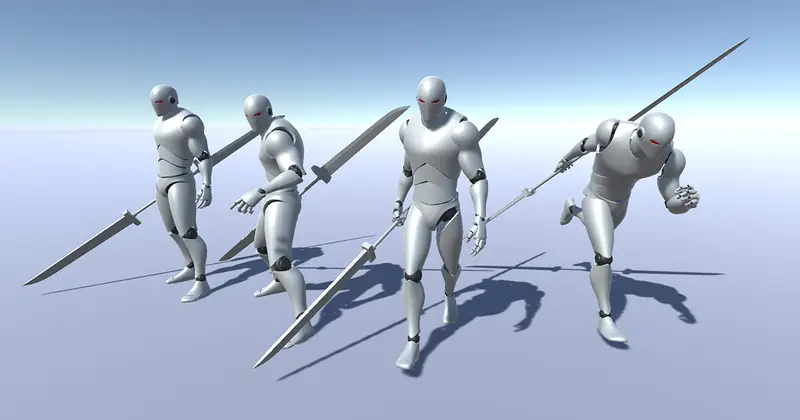
In third-person action games, the feel of heavy weaponry comes down almost entirely to animation timing, follow-through, and weight distribution. If your keyframes lack weight, a massive two-handed sword feels like a foam prop. GreatSword_Animset addresses this exact mechanical challenge by providing a dedicated library of heavy-blade clips designed specifically for Unity's Mecanim Humanoid animation architecture.
In my experience building action controllers, integrating multi-hit melee combos often breaks down when clips lack clear pose transitions or standardized stance frames. This asset structures its clips around consistent neutral stances—guarding, idle, drawn, and sheathed states—allowing developers to construct tight, responsive state machines using Unity's built-in Animator Controller assets without having to manually clean up retargeting offsets.
Core Technical Features & Highlights
From an architectural standpoint, the set relies on standard Mecanim bones, which keeps retargeting overhead low and allows effortless dynamic retargeting across custom character meshes (such as Synty packs or custom Maya/Blender models).
- Complete Motion Coverage: Includes directional locomotion (walk, run, sprint), evasive rolls, block/parry reactions, multi-stage light/heavy attack combos, and sword draw/sheathe transitions.
- Dual-Mode Clips: Features both Root Motion clips for ground-truth physical displacement and zero-displacement In-Place variations for code-driven velocity systems.
- Clean Pose Match Points: Attack frames finish on predictable keyframes, preventing erratic blending transitions inside Animator Override Controllers.
- High-Impact Motion Curves: Keyframes feature dramatic velocity curves with heavy anticipation frames and crisp recovery phases, making frame-accurate hit-box window activation simple via Animation Events.
- Pipeline Agnostic: Because this package contains raw animation data and humanoid rigs, it functions identically across the Standard Built-in Render Pipeline, Universal Render Pipeline (URP), and High Definition Render Pipeline (HDRP) without shader or script dependencies.
Ideal Use Cases & Game Genres
Honestly, dynamic high-impact animations are difficult to keyframe from scratch. This collection shines brightest in mechanics-heavy genres where combat readability is paramount:
- Soulslike & Stamina-Based Action RPGs: Perfect for high-commitment attacks where long wind-ups and recovery windows dictate combat pacing.
- Character Action & Hack-and-Slash Games: Great for building dynamic branching combo trees using discrete timing windows and stance changes.
- Third-Person Fantasy RPGs: Fits main character keyframe sets or heavy boss enemy types requiring distinct visual telegraphed attacks.
- Multiplayer Combat Arenas: In-place clip variations allow server-authoritative netcode scripts to handle movement validation while maintaining smooth visual playback on client prediction proxies.
Quick-Start Unity Setup & Integration Guide
Setting up GreatSword_Animset inside an existing project requires configuring your character's rig and connecting state transitions via C# and Mecanim parameters. Here is how I hook up a typical combat loop:
1. Character Rig Configuration
Ensure your target character mesh is imported as Humanoid under the model's Rig tab in the Inspector. Verify that bone mappings (especially spine, shoulders, and wrists) align correctly in the Mecanim rig editor before attaching clips.
2. C# Combat Input & State Handler
Attach the following script to your player character containing an Animator component. This component reads input buffers and drives combat state transitions dynamically:
using UnityEngine;

[RequireComponent(typeof(Animator))]
public class GreatswordCombatController : MonoBehaviour
{
    [Header("Components")]
    [SerializeField] private Animator animator;

    [Header("Settings")]
    [SerializeField] private float comboWindow = 1.2f;

    private int comboStep = 0;
    private float lastAttackTime;

    private static readonly int ComboStepHash = Animator.StringToHash("ComboStep");
    private static readonly int AttackTriggerHash = Animator.StringToHash("Attack");
    private static readonly int IsGuardingHash = Animator.StringToHash("IsGuarding");

    private void Awake()
    {
        if (animator == null)
        {
            animator = GetComponent<Animator>();
        }
    }

    private void Update()
    {
        HandleCombatInput();
    }

    private void HandleCombatInput()
    {
        // Reset combo window if player hesitates too long
        if (Time.time - lastAttackTime > comboWindow && comboStep > 0)
        {
            comboStep = 0;
            animator.SetInteger(ComboStepHash, 0);
        }

        // Handle Heavy / Light swing input
        if (Input.GetButtonDown("Fire1"))
        {
            comboStep = (comboStep % 3) + 1;
            animator.SetInteger(ComboStepHash, comboStep);
            animator.SetTrigger(AttackTriggerHash);
            lastAttackTime = Time.time;
        }

        // Handle Guarding State
        bool isGuarding = Input.GetButton("Fire2");
        animator.SetBool(IsGuardingHash, isGuarding);
    }
}
3. Event Triggering for Weapon Colliders
To register damage accurately, open the attack animation clips in Unity's Animation Window, click Add Event at the exact frame where the blade swing reaches maximum acceleration, and bind it to a method such as EnableWeaponHitbox() on your damage script.
Pros & Cons Assessment
- Pros:
- Excellent sense of physics and weight distribution in keyframes.
- Comprehensive coverage of combat states (attacks, blocks, parries, hit reactions, locomotion).
- Clean Humanoid Rig compatibility allows easy retargeting across custom avatars.
- Includes both Root Motion and In-Place motion clips for flexible architecture.
- Cons:
- Requires setup of custom Animator Controllers if your game uses non-standard layer masks or IK pass-throughs.
- Animation events for hit detection must be manually set up on individual clips to match your project's hit-box system.
Asset Details & Specifications
| Category | 3D / Animations |
|---|---|
| Latest Version | v2.0 |
| File Size | 339.51 MB |
| Added to Platform | July 19, 2026 |
| Views | 4 views |
| Downloads | 4 downloads |
| Favourites | 0 favourites |
| Official Store | Buy Original License on Unity Asset Store → |
| Issue with Package? | Report Broken Link → |