Low Poly Mega City
About Low Poly Mega City – Unity 3D Environment
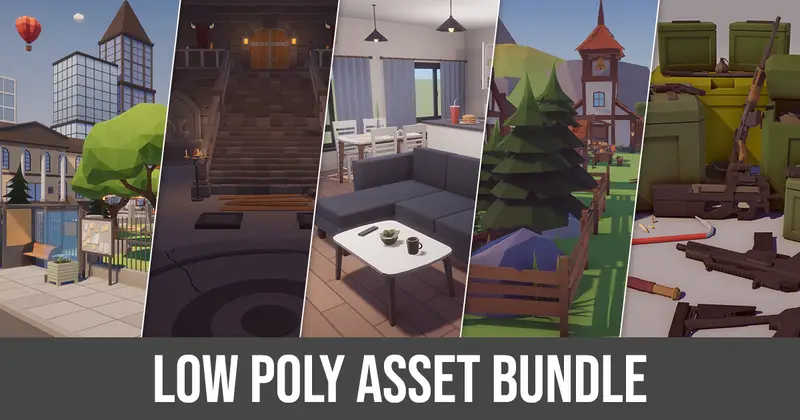
Low Poly Mega City Unity Asset Overview
As a game developer with over eight years working in Unity, I have built and optimized numerous urban environments for both mobile and desktop targets. Cityscapes are notoriously heavy on CPU and GPU performance due to high draw call counts, complex mesh hierarchies, and sub-optimal material passes. The Low Poly Mega City asset package addresses this exact issue by adopting a hyper-efficient, palette-based modular architecture.
Instead of relying on multi-texture setups and complex PBR pipelines, this environment kit utilizes a single, tightly packed texture atlas palette. This design decision drastically minimizes vertex rendering overhead and allows Unity's static and dynamic batching systems to consolidate hundreds of modular building blocks, roads, and props into a handful of draw calls. In my experience, this architectural approach is mandatory if you intend to hit high frame rates on low-tier mobile devices or VR hardware without sacrificing visual density.
Core Technical Features & Highlights
The layout and asset composition of Low Poly Mega City cover everything required to construct a functional stylized metropolis. From skyscraper blocks to granular street decorations, the kit is broken down cleanly into distinct technical components:
- Optimized Mesh Geometry: Buildings, vehicles, and road systems are designed with clean, low polygon counts, keeping memory bandwidth and triangle counts low across large open areas.
- Single Palette Texture Mapping: Most environmental assets map UV coordinates directly onto a master color palette texture, enabling effective GPU Instancing and reducing state changes.
- Modular Road & Building Grid System: Grid-aligned pivot points make snapping tiles together straightforward in the Unity Editor, avoiding annoying seam gaps during scene assembly.
- Included Rigged Characters & Vehicles: Low-poly civilian and emergency character meshes come pre-rigged for standard Humanoid Mecanim setups, paired with matching stylized vehicles.
- Lightweight Visual Effects: Custom particle setups for smog, neon signs, street highlights, and exhaust emissions created to blend visually with the low-poly aesthetic.
- Multi-Pipeline Material Support: Native materials pre-configured for the standard Built-in Render Pipeline, along with effortless conversion pathways for the Universal Render Pipeline (URP).
Ideal Use Cases & Game Genres
Given its lightweight construction and clean visual style, this asset fits naturally into several specific game frameworks:
Mobile Racing & Endless Runners
Continuous level generation requires fast asset instantiation and minimal memory footprints. Because these road segments and building prefabs share standard material passes, you can stream urban blocks dynamically without experiencing visual stutter or garbage collection spikes.
Hyper-Casual & Arcade Action Games
If you are building quick-turnaround arcade prototypes or hyper-casual titles, the vibrant, readable aesthetic allows gameplay elements—such as player characters, targets, and collectibles—to stand out clearly against the urban background.
Isometric Strategy & City Builders
Top-down and isometric camera perspectives benefit immensely from modular tileable structures. You can easily attach runtime scripts to instantiate, rotate, and swap building modules on a grid layout.
Quick-Start Unity Setup & Integration Guide
Setting up this kit efficiently in a modern Unity project requires a few deliberate steps to maximize batching and pipeline performance. Here is how I usually approach initializing this environment kit in a standard project:
1. Pipeline Material Setup (URP)
If your project uses the Universal Render Pipeline (URP), Unity may initially display missing shader warnings (bright pink materials). To resolve this cleanly:
- Navigate to
Edit > Render Pipeline > Universal Render Pipeline. - Select
Upgrade Project Materials to UniversalRP Materialsor manually reassign the main low-poly palette shader toUniversal Render Pipeline/Simple LitorUnlitdepending on your target lighting style. - Ensure that Enable GPU Instancing is ticked on the master palette material to keep batching active.
2. Editor Grid Snapping Setup
Because the road tiles and building modules rely on predictable metric dimensions, configure Unity's grid system before greyboxing your layout. Go to the grid settings in the Scene View and set snap increments to 1.0 or 2.0 units. This ensures seamlessly aligned road segments with zero visual overlapping.
3. Sample Code: Simple Traffic Waypoint Controller
To bring your mega city to life, you will want vehicles navigating the modular grid. Here is a practical, lightweight C# script you can attach to vehicle prefabs to make them follow designated road node waypoints across your grid:
using UnityEngine;

namespace MegaCityKit
{
    [RequireComponent(typeof(Rigidbody))]
    public class SimpleVehicleController : MonoBehaviour
    {
        [SerializeField] private Transform[] waypoints;
        [SerializeField] private float moveSpeed = 10.0f;
        [SerializeField] private float turnSpeed = 4.0f;
        [SerializeField] private float nodeThreshold = 0.8f;

        private int currentTargetIndex = 0;

        private void Update()
        {
            if (waypoints == null || waypoints.Length == 0)
                return;

            Transform targetNode = waypoints[currentTargetIndex];
            Vector3 targetPosition = new Vector3(targetNode.position.x, transform.position.y, targetNode.position.z);
            Vector3 moveDirection = (targetPosition - transform.position).normalized;

            // Handle smooth rotation towards the next waypoint
            if (moveDirection != Vector3.zero)
            {
                Quaternion targetRotation = Quaternion.LookRotation(moveDirection);
                transform.rotation = Quaternion.Slerp(transform.rotation, targetRotation, Time.deltaTime * turnSpeed);
            }

            // Move vehicle forward
            transform.position = Vector3.MoveTowards(transform.position, targetPosition, moveSpeed * Time.deltaTime);

            // Check if we hit the current node
            if (Vector3.Distance(transform.position, targetPosition) < nodeThreshold)
            {
                currentTargetIndex = (currentTargetIndex + 1) % waypoints.Length;
            }
        }
    }
}
Pros & Cons Assessment
Pros
- Exceptional Frame Rate Efficiency: Palette texturing enables brilliant dynamic and static batching performance.
- Extensive Asset Variety: Modular skyscrapers, residential units, park elements, street lights, signage, and props give you broad creative flexibility.
- Low Mobile Memory Footprint: Minimal texture sizes keep VRAM utilization low, making it friendly for older hardware.
- Pre-Rigged Rigidity: Character models integrate effortlessly with Unity's standard Mecanim Animator system.
Cons
- Collider Optimization Needed: Mesh colliders on complex building prefabs can hurt runtime physics performance if left unmanaged; replacing them with simple
BoxColliderprimitives is recommended. - Fixed Aesthetic Style: The distinct low-poly look does not easily blend with semi-realistic or photorealistic asset packs.
Asset Details & Specifications
| Category | 3D / Environments |
|---|---|
| Latest Version | v1.04 |
| File Size | 111.29 MB |
| Added to Platform | August 12, 2026 |
| Views | 3 views |
| Downloads | 4 downloads |
| Favourites | 0 favourites |
| Official Store | Buy Original License on Unity Asset Store → |
| Issue with Package? | Report Broken Link → |