Paladin Anim Set
About Paladin Anim Set – Unity 3D Asset
Paladin Anim Set Unity Asset Overview
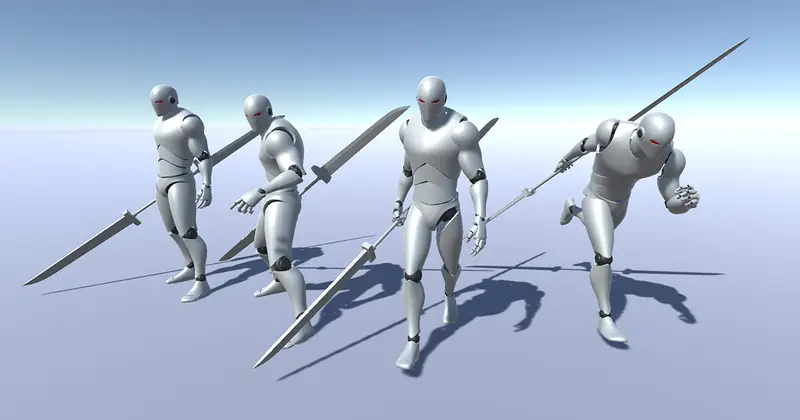
In my experience building third-person combat systems, finding animation assets that balance visual weight with responsive control is notoriously difficult. Many animation packs look great in a preview video, but as soon as you drop them into a Unity controller, they feel floaty or ungrounded. The Paladin Anim Set tackles this problem head-on by providing a comprehensive set of heavy martial animations designed specifically for sword-and-shield or heavy melee archetypes.
The asset uses Unity's standard Mecanim Humanoid Rig architecture, making retargeting to standard character models like Mixamo or custom Synty characters straightforward. Mechanically, the clips are split into dual paradigms: Root Motion versions for cinematic accuracy and physics-driven movement, alongside In-Place variations for tight, input-responsive player controllers. Here is the key takeaway: having both movement paradigms authored directly by the animator saves dozens of hours of manual curve editing in Unity's Animation Window.
Core Technical Features & Highlights
The pack focuses heavily on realistic physics weight, showing distinct anticipation, contact, and recovery phases across all motion clips. Below is a breakdown of the primary technical features included in the set:
- Standard Humanoid Mapping: Fully compatible with Unity's Mecanim Avatar system, allowing effortless retargeting to custom rigged characters.
- Dual Motion Formats: Every locomotion and combat attack clip comes with dedicated Root Motion and In-Place variations.
- Comprehensive Stance Coverage: Includes idle, locomotion blend trees (walk, jog, sprint in 8 directions), block states, hit reactions, deaths, and multi-stage combo sequences.
- Precise Contact Timing: Clear pose frames for adding Animation Events to trigger combat hitboxes, sound effects, and particle systems.
- Clean Animation Curves: Smooth velocity curves that prevent foot sliding when using procedural movement or state machine transitions.
Locomotion & Blend Tree Structure
Locomotion is set up using 2D Directional Blend Trees. The directional transition angles feel smooth, preventing hip popping during sharp turnarounds. When hooking these clips up to a NavMeshAgent or a custom CharacterController, the velocity vectors match standard input axes cleanly without requiring aggressive dampening parameters in Animator.SetFloat().
Ideal Use Cases & Game Genres
While named after the classic holy knight archetype, the movement mechanics and attack arcs in this pack translate across several distinct genres:
- Soulslike & Action RPGs: Excellent for deliberate, high-commitment combat mechanics where telegraphing attacks and recovery windows matter.
- Third-Person Hack & Slash: The structured combo clips chain together smoothly using normalized transition times in the Animator Controller.
- Top-Down Dungeon Crawlers: Strong posture lines and exaggerated sword swings make key combat frames easily readable even from high-angle orbital cameras.
- Co-op Fantasy Prototypes: Ideal for setting up quick, production-ready class prototypes during game jams or mechanics validation phases.
Quick-Start Unity Setup & Integration Guide
Integrating this set into an existing Unity project takes only a few minutes if your character avatar is mapped correctly. Follow these core steps to set up a basic combat state listener:
Step 1: Rig Configuration
Select the imported animation FBX files in your Project window, navigate to the Rig tab in the Inspector, change the Animation Type to Humanoid, and set the Avatar Definition to Create From This Model (or copy from your project's main base character avatar).
Step 2: C# Combat Trigger Integration
Attach the following production-ready script to your character GameObject to handle basic combo inputs and process key impact frames via Animation Events:
using UnityEngine;

[RequireComponent(typeof(Animator))]
public class PaladinCombatController : MonoBehaviour
{
    private Animator animator;
    private static readonly int ComboStepHash = Animator.StringToHash("ComboStep");
    private static readonly int AttackTriggerHash = Animator.StringToHash("Attack");
    private static readonly int IsBlockingHash = Animator.StringToHash("IsBlocking");

    [Header("Combat Settings")]
    [SerializeField] private float comboResetTime = 1.0f;
    private float lastAttackTimestamp;
    private int currentComboStep = 0;

    private void Awake()
    {
        animator = GetComponent<Animator>();
    }

    private void Update()
    {
        // Reset combo if idle too long
        if (Time.time - lastAttackTimestamp > comboResetTime)
        {
            currentComboStep = 0;
            animator.SetInteger(ComboStepHash, 0);
        }

        // Blocking Input
        bool isBlocking = Input.GetButton("Fire2");
        animator.SetBool(IsBlockingHash, isBlocking);
    }

    public void ExecuteAttack()
    {
        lastAttackTimestamp = Time.time;
        currentComboStep = (currentComboStep % 3) + 1;

        animator.SetInteger(ComboStepHash, currentComboStep);
        animator.SetTrigger(AttackTriggerHash);
    }

    // Animation Event Callback - Call this from key frames inside Unity Animation Window
    public void OnHitFrameTrigger()
    {
        // Execute spherecast hit detection or raise combat event
        Debug.Log("Hit frame registered: Checking physical collisions.");
    }
}
Pros & Cons Assessment
- Pros:
- Weighty FX-Ready Motions: Attacks feature natural keyframe pauses that make attaching sword trails and impact particles feel natural.
- Versatile Rig Mapping: Mecanim setup works right out of the box with standard Unity humanoid configurations.
- In-Place & Root Motion Options: Great flexibility whether you use physics velocity driving or anim-driven displacement.
- Cons:
- Heavy Character Bias: The motions carry heavy armor momentum; they won't suit agile, rogue-like characters without heavy speed adjustments.
- Manual Event Setup Required: You will still need to manually place
Animation Eventson clips for frame-exact audio and damage logic.
Asset Details & Specifications
| Category | 3D / Animations |
|---|---|
| Latest Version | v2.0 |
| File Size | 204.02 MB |
| Added to Platform | February 11, 2026 |
| Views | 8 views |
| Downloads | 4 downloads |
| Favourites | 1 favourites |
| Issue with Package? | Report Broken Link → |