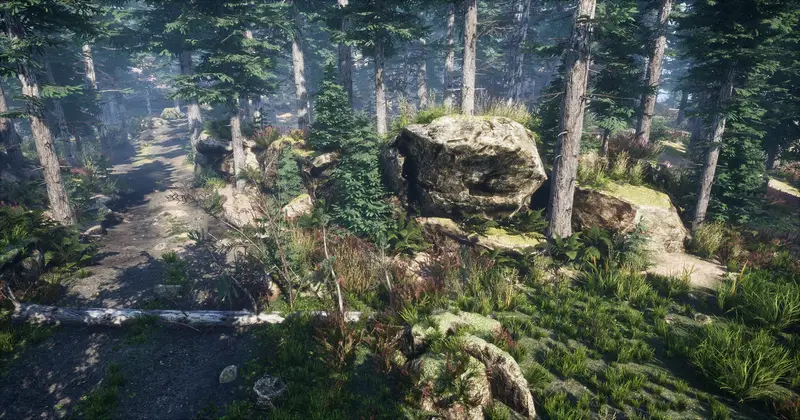
Animated Vegetation Ultimate Pack
About Animated Vegetation Ultimate Pack – Unity 3D Asset
Animated Vegetation Ultimate Pack Unity Asset Overview
If you have worked on any environment with open fields or dense forests, you know that rendering thousands of animated plants without tanking your frame rate is one of the hardest optimization puzzles in game development. Standard bone-based skeletal animations for plants destroy CPU performance, while flat static meshes leave your environment feeling lifeless.
The Animated Vegetation Ultimate Pack tackles this exact issue by offloading foliage motion entirely to the GPU. Instead of relying on heavy rigging, it utilizes vertex displacement shaders driven by noise maps and global vectors. In my experience testing this package across various scene scales, the architectural separation between asset geometry and shader-driven motion is exceptionally clean. It allows you to place high-density foliage while maintaining low draw calls thanks to native GPU Instancing and SRP batching compatibility.
Core Technical Features & Highlights
What sets this collection apart isn't just the visual fidelity of the 3D models, but how the underlying shader pipeline handles vertex manipulation and rendering efficiency.
Vertex-Driven Animation Engine
The pack replaces traditional skeletal animations with lightweight HLSL vertex displacement shaders. Motion is broken down into primary wind bending (trunk/main stem), secondary branch sway, and high-frequency leaf fluttering. By passing global parameters to the GPU, hundreds of distinct trees and bushes react synchronously to global wind vectors with zero CPU animation overhead.
Optimized LOD & Impostor Chains
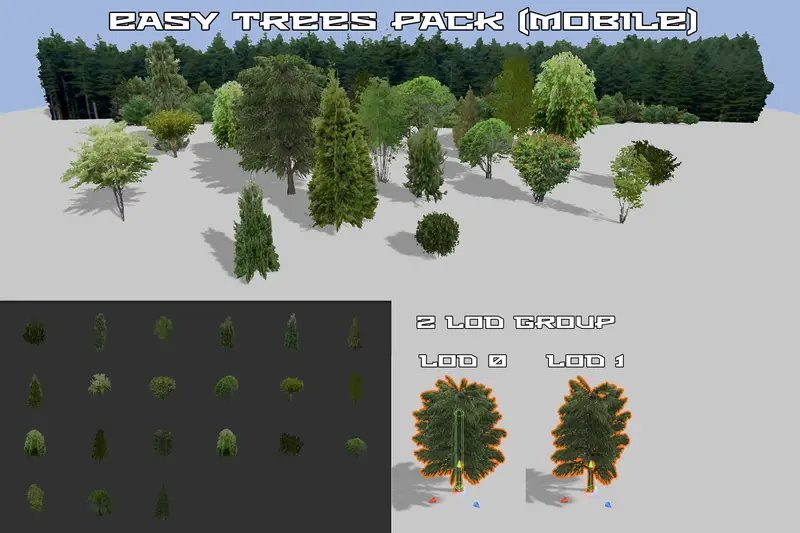
Every asset comes paired with pre-configured LOD Groups. High-detail LOD0 meshes transition smoothly down to simplified geometry, terminating in low-overhead billboards or camera-aligned impostors. The transition distances are well-tuned out of the box, drastically reducing geometry overdraw during distant terrain rendering.
Pipeline Flexibility & Key Technical Capabilities
- Universal Render Pipeline (URP) & HDRP Support: Includes dedicated materials and Shader Graph variants tailored for both pipelines.
- SRP Batcher Compatibility: Shaders are written to keep uniform buffers persistent, allowing Unity's SRP Batcher to group draw calls efficiently.
- Subsurface Scattering (SSS): Built-in SSS map support simulates light filtering through translucent leaves, delivering a realistic look under direct sunlight.
- Global Wind Property Integration: Allows runtime scripts to adjust environment-wide turbulence, direction, and strength globally via
Shader.SetGlobalVector.
Ideal Use Cases & Game Genres
Honestly, foliage packs can be hit or miss depending on your targeted hardware specs. Based on my benchmarking, this pack fits nicely into several specific production setups:
- Open-World Survival & RPGs: Excellent for sweeping environments where dense forests and grass fields need to stretch out to the horizon without killing frame rates.
- First-Person Shooters (FPS): High-fidelity LOD0 models provide crisp detail up close for weapon aiming and close-quarters stealth gameplay in tall grass.
- Mobile & VR Titles: By disabling higher-tier shader features like dynamic SSS and utilizing lower LOD tiers, the assets scale down remarkably well for performance-constrained targets.
Quick-Start Unity Setup & Integration Guide
Integrating this asset into an existing URP or HDRP project requires only a few configuration steps to get the global wind parameters running properly across your scenes.
Step 1: Shader Target Conversion
Upon importing the package into a URP project, select the included material folder and convert them via Edit > Render Pipeline > Universal Render Pipeline > Upgrade Project Materials if materials render as pink placeholders.
Step 2: Implementing a Global Wind Controller
To control the vegetation movement dynamically via code, create a simple controller script in your project. Attach the following C# script to an empty GameObject named EnvironmentManager in your scene:
using UnityEngine;

[ExecuteAlways]
public class GlobalWindController : MonoBehaviour
{
    [Header("Wind Direction & Speed")]
    [SerializeField] private Vector3 windDirection = new Vector3(1.0f, 0.0f, 0.5f);
    [SerializeField] private float windSpeed = 1.5f;

    [Header("Turbulence Settings")]
    [SerializeField] private float gustFrequency = 0.8f;
    [SerializeField] private float gustStrength = 0.4f;

    // Shader Property IDs for optimal performance (avoiding string lookups)
    private static readonly int GlobalWindDirID = Shader.PropertyToID("_GlobalWindDirection");
    private static readonly int GlobalWindSpeedID = Shader.PropertyToID("_GlobalWindSpeed");
    private static readonly int GlobalWindGustID = Shader.PropertyToID("_GlobalWindGust");

    private void Update()
    {
        Vector3 normalizedDirection = windDirection.normalized;

        // Pass global values directly to GPU shaders
        Shader.SetGlobalVector(GlobalWindDirID, new Vector4(normalizedDirection.x, normalizedDirection.y, normalizedDirection.z, 0f));
        Shader.SetGlobalFloat(GlobalWindSpeedID, windSpeed);
        Shader.SetGlobalFloat(GlobalWindGustID, Mathf.Sin(Time.time * gustFrequency) * gustStrength);
    }
}
Step 3: Terrain & Vegetation Painter Integration
If painting these models onto a Terrain component, ensure that your terrain settings have Preserve Tree Prototypes checked and Enable Instancing toggled on under the Terrain Mesh settings to take full advantage of GPU instanced drawing.
Pros & Cons Assessment
Pros
- Production-Ready Performance: Offloading animation calculations to the GPU keeps the main thread clear for game logic and physics.
- Comprehensive Model Variety: Contains a wide selection of trees, shrubs, field grasses, and ground-cover plants.
- Clean Asset Hierarchy: Prefabs are neatly structured with pre-assigned
LODGroupcomponents and sensible colliders. - PBR Material Workflows: Maps are properly authored with Albedo, Normal, Smoothness, Ambient Occlusion, and Subsurface masks.
Cons
- Shader Graph Tweaks Required for Custom Pipelines: If you use a customized lighting model, you may need to edit the vertex nodes manually inside Shader Graph.
- Overdraw on Max Density: High-density grass patches can still trigger alpha overdraw on low-end mobile devices if camera angles stay low to the ground.
Asset Details & Specifications
| Category | 3D / Vegetation |
|---|---|
| Latest Version | v1.04 |
| File Size | 390.32 MB |
| Added to Platform | August 17, 2026 |
| Views | 3 views |
| Downloads | 4 downloads |
| Favourites | 1 favourites |
| Official Store | Buy Original License on Unity Asset Store → |
| Issue with Package? | Report Broken Link → |